HOW-TO GUIDE
Why Does My Multimeter Show the Wrong Diode Voltage?
By the OhmSavvy Research Team ·

What the diode-test number really is
In diode mode the meter becomes a small current source with a limited output voltage. It forces its test current through whatever sits between the probes and displays the voltage that develops. With a junction connected in the forward direction, that voltage is the forward drop at that particular current and temperature. Meters display it in volts or millivolts depending on the model, so 0.583 and 583 can be the same reading.
Two consequences explain most "wrong" readings. First, forward voltage climbs with current, so a figure taken at a fraction of a milliamp sits below the value printed for full load. Second, the meter can only push current if the part needs less voltage than the meter's open-circuit limit. Anything that needs more simply shows OL. Neither the test current nor the open-circuit voltage is universal, and both are listed in the specification section of most meter manuals.
Typical readings by diode type
Before deciding a reading is wrong, check it against the right family. These are typical diode-mode values for parts at room temperature, not limits, and individual meters will land slightly higher or lower.
Why the reading looks wrong
| Symptom | Likely cause | How to check | Fix |
|---|---|---|---|
| Reading below the datasheet Vf | Low meter test current; datasheet quotes full load | Compare with a new part of the same type on the same meter | None; this is normal |
| OL in both directions on an LED | LED needs more than the meter's open-circuit voltage | Check the manual's diode-test voltage | Test with a battery and series resistor |
| OL forward, reading in reverse | Probes reversed or cathode band misread | Swap probes; confirm the band end | Red on anode, black on cathode |
| Low reading in circuit, normal out of circuit | Resistor or other junction in parallel | Lift one leg and retest | Judge the part out of circuit |
| Reading creeps up while probes are held | Capacitor across the diode charging | Watch whether it settles; discharge first | Wait, or isolate the diode |
| Low reading in both directions | Shorted or leaky junction | Test out of circuit | Replace the diode |
| Reverse reading on a Zener | Low-voltage Zener breaking down below the meter's test voltage | Compare with the Zener's rated voltage | Normal for that part; see the Zener guide |
| Readings drift or LEDs that used to read now show OL | Weak meter battery lowering test voltage | Check battery indicator; test a known-good diode | Replace the meter battery |
| Reading in Ω instead of V | Dial on resistance, or function button not pressed | Look for the diode symbol on the display | Select diode test |
1Confirm the function and the units
Many meters put diode test and continuity on one dial position and switch between them with a button. Check that the diode symbol is on the display, not the ohms sign or the speaker icon, and note whether the reading is in V or mV. Resistance mode on a diode gives a number that depends on the meter's ohms test current and means very little, which is why the standard diode test always uses the dedicated mode.
2Calibrate your expectation with a known-good part
Keep a new 1N4148 or 1N4007 in your parts drawer and measure it whenever a reading looks suspicious. That gives you your own meter's silicon reference at its own test current. If the reference reads about where you expect and the suspect part does not, the part is the issue. If the reference also reads oddly, the meter, its battery or its leads need attention.
3Check probe orientation
Red goes to the anode, black to the cathode, which is the end with the band on most through-hole and SMD diodes. Surface-mount markings are easy to misread, and some packages mark the anode instead. Measure both directions every time; a single reading tells you little on its own.
4Take it out of the circuit if the numbers disagree
A reading that is lower than the family value, or a reverse reading where you expected OL, is often the board rather than the diode. Desolder one leg, or remove the part, and test again. Remove all power and discharge capacitors before probing any board in diode mode.
5Rule out the meter battery and temperature
A tired battery can lower the open-circuit voltage enough that LEDs which used to light now read OL, and on some meters it makes all readings unreliable before the low-battery symbol appears. Temperature matters too: a silicon junction drops roughly 2 mV per degree Celsius as it warms, so a freshly desoldered part reads low until it cools.
In-circuit readings
The meter cannot see the diode on its own once it is soldered to a board. Any resistor, transistor junction or IC input connected across it shares the test current, and the display shows the voltage across the whole combination. A low-value resistor in parallel can pull a healthy silicon diode's reading well below its normal value, and if it is low enough the reverse reading will no longer be OL either. A capacitor across the diode makes the reading start low and climb as it charges.
Comparing against an identical working board is a useful shortcut when lifting parts is not practical: if the same two points read the same on both boards, the diode is very likely fine.
Zeners and LEDs
A Zener reads like an ordinary silicon diode in the forward direction. In reverse it should normally show OL, because most Zener voltages are above what a meter's diode test can supply. A low-voltage Zener is the exception: if its breakdown voltage is below the meter's open-circuit voltage, it conducts in reverse and the meter shows a reading near that breakdown value. That can look like a leaky diode when it is behaving exactly as designed. Measuring the breakdown voltage properly needs an external supply and resistor, as described in how to test a Zener diode.
LEDs run into the opposite limit. Their forward voltage is higher than a silicon diode's, and blue and white parts in particular may need more than the meter's open-circuit voltage. If it cannot reach that voltage, the meter shows OL in both directions on a perfectly good LED. Where it can, the LED often glows faintly during the test, which is a handy confirmation. LED strips and filament bulbs put several LEDs in series, so diode mode will not light those at all.
Diode mode is for unpowered parts
Compare like with like
Meters for component work
Any meter with a diode function will sort good junctions from shorted and open ones. For bench work where you also chase low resistances and small currents, a higher-count meter with a relative mode helps.
Bench meters for component testing

22,000-count True RMS with REL mode, hFE and a USB link; rated CAT III 1000V / CAT IV 600V.

60,000 counts, 0.03% best DC voltage accuracy, relative zero and Max/Min/Avg for bench and PCB repair.
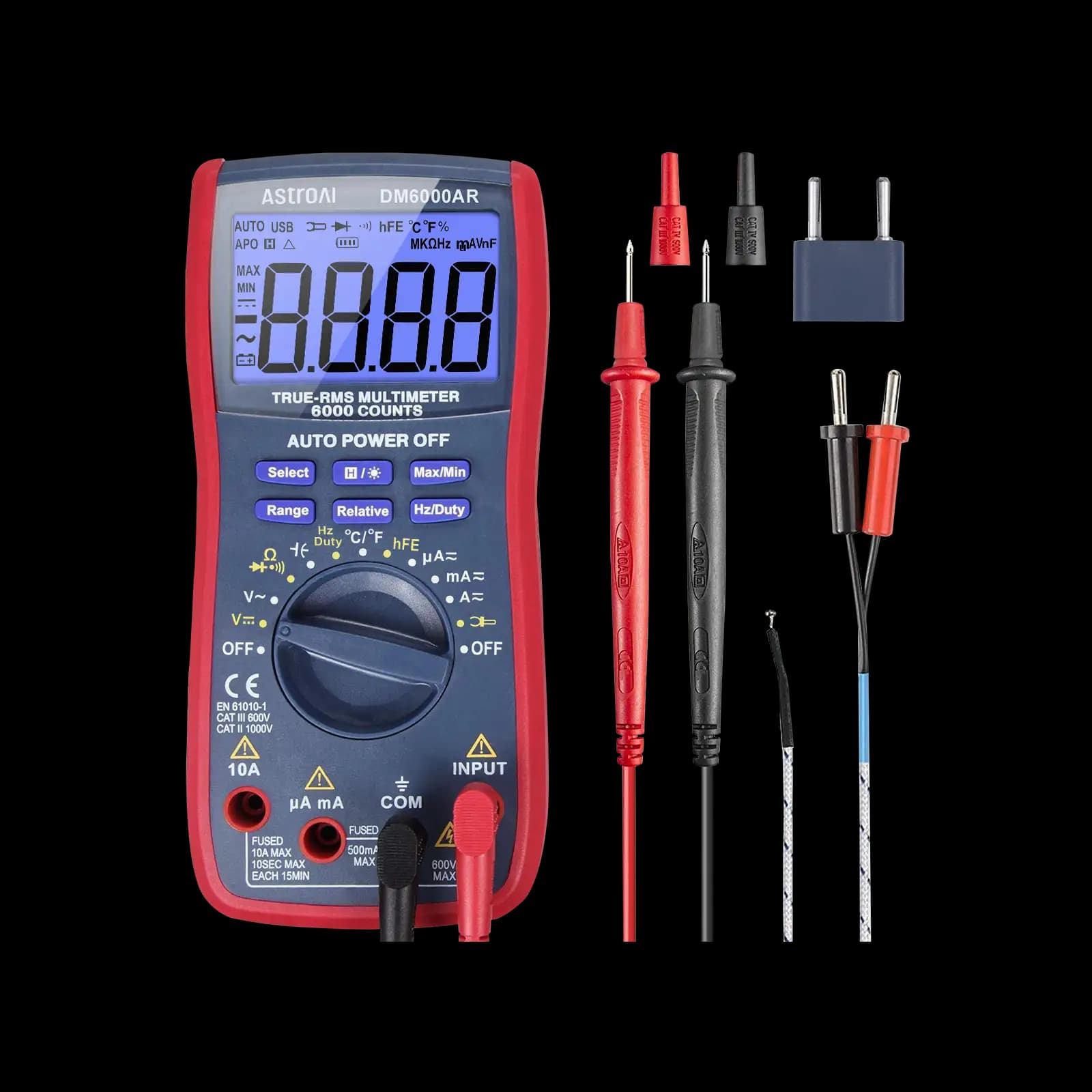
A low-cost 6,000-count True RMS meter for hobby electronics. AstroAI states no CAT rating, so keep it off mains.
As an Amazon Associate I earn from qualifying purchases. Prices and availability are shown on Amazon.
Frequently asked questions
Why does my multimeter show 0.5 V for a diode rated at 1 V forward voltage?
The datasheet figure is the forward voltage at the diode's rated current, often an amp or more for a rectifier. A meter's diode test pushes only a small current, so the junction drops less voltage. A 1N4007-style rectifier commonly reads around 0.5 to 0.6 V on a meter even though its datasheet maximum is about 1.1 V at 1 A.
Why does my LED show OL in diode mode when it works fine?
The meter's open-circuit test voltage is probably lower than the LED's forward voltage. Red LEDs often start conducting below 2 V, but blue, white and many green LEDs need closer to 3 V, which some meters cannot supply. The LED is not faulty; test it with a battery and a series resistor, or with a meter whose manual lists a higher diode-test voltage.
Why do I get two different diode readings from two multimeters?
Each meter uses its own test current, and forward voltage rises with current. A meter pushing a milliamp will read a little higher than one pushing a fraction of that, often by a few tens of millivolts. Both readings are valid. Compare parts on the same meter, and use the manual's diode-test specification if you need to know the conditions.
Does temperature change a diode-test reading?
Yes. A silicon junction's forward voltage falls by roughly 2 mV for every degree Celsius it warms, so a diode just desoldered, held in warm fingers or sitting next to a hot heatsink reads lower than one at room temperature. Let the part cool before comparing it with a reference value or with another diode.
What diode voltage means a transistor junction is bad?
A good silicon bipolar transistor's base-emitter and base-collector junctions each read roughly like a silicon diode, around 0.5 to 0.7 V, and OL when reversed. Near-zero readings in both directions mean a shorted junction, OL both ways means open, and a low reading between collector and emitter in either direction suggests a breakdown.
Where to go next
How to Test a Diode With a Multimeter →
The basic forward and reverse check, step by step.
How to Test a Zener Diode With a Digital Multimeter →
Measuring a Zener's breakdown voltage, which diode mode alone can't show.
Why Resistance Readings Change on a Circuit Board →
The same parallel-path effect, seen on the ohms range.
How to Test an LED Strip With a Multimeter →
When the LEDs are in series and diode mode can't light them.


