REVIEW · MULTIMETERS
AstroAI DM6000AR Review
The go-to recommendation for Arduino and Raspberry Pi tinkering — cheap enough not to worry about.
By the OhmSavvy Research Team ·
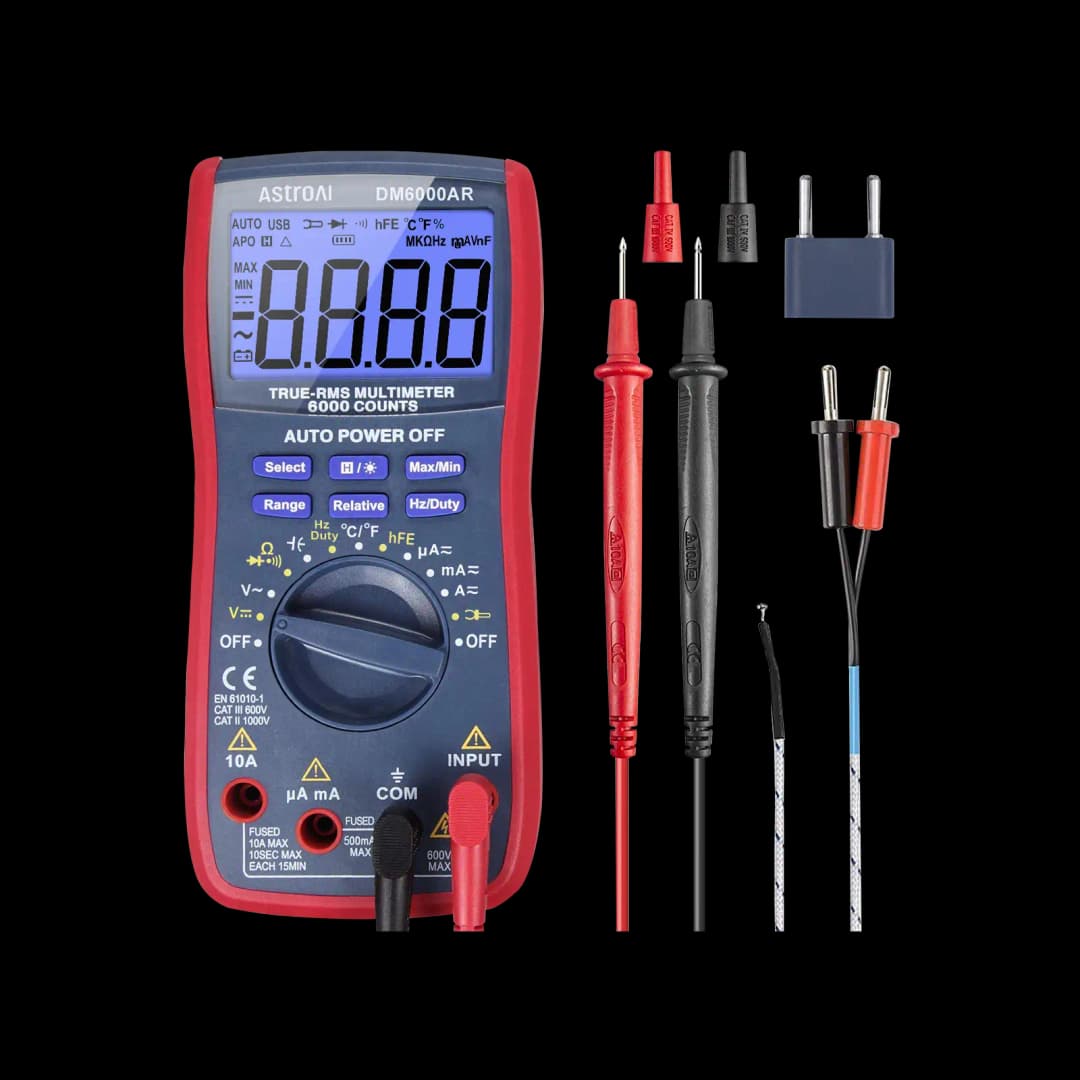
| Model | AstroAI DM6000AR |
|---|---|
| Accuracy | True RMS, 6,000-count |
| Safety rating | Not stated by AstroAI |
| Auto-ranging | Yes |
| Best for | Electronics hobbyists working with microcontrollers |
| Review status | Desk research, not bench-tested |
Disclosure: OhmSavvy earns a commission from qualifying Amazon purchases made through these links, at no extra cost to you. How we're funded.
The verdict
This is the meter you'll see recommended most often for Arduino, Raspberry Pi, and general electronics tinkering — True RMS and 6,000-count resolution give it more precision than its price suggests, with both auto and manual ranging on tap.
Consider it if
- ✓You work on Arduino, Raspberry Pi, or other low-voltage projects
- ✓You want True RMS and 6,000-count resolution on a small budget
- ✓You want both auto and manual ranging on a budget meter
- ✓You'd like duty cycle, capacitance and temperature on the dial for PWM, filter and thermal checks
Skip it if
- ✕You'll measure household outlets, panels or appliance wiring — AstroAI states no CAT rating
- ✕You want high-quality test leads out of the box
- ✕You need calibration services or a broad accessory range
The trade-off: It's inexpensive enough not to worry about on the bench. The build and included leads reflect that price, and that's a reasonable trade for a meter that mostly sees low-voltage, low-stakes use. The one trade you shouldn't make is safety: without a published CAT rating, it doesn't belong on mains wiring.
Key specifications
- Accuracy
- True RMS, 6,000-count
- Safety rating
- Not stated by AstroAI
- Auto-ranging
- Yes
- Best for
- Microcontroller & electronics projects
Checked against the manufacturer's official product page or datasheet and the official Amazon listing when this model was added to our guide.
Strengths and limitations
Reasons to buy
- +Very affordable for True RMS + 6,000-count resolution
- +6,000-count display resolves small changes
- +Both auto and manual ranging available
Reasons to avoid
- −Build and included leads reflect the budget price point
- −No CAT rating stated by AstroAI, so keep it to low-voltage electronics, not panels
Performance assessment
We haven't bench-tested this unit. This assessment is based on its published specifications and on what those specifications mean in practice. How we research.
Resolution for electronics work
A 6,000-count display shows more digits than a 2,000- or 4,000-count meter on the same range, which helps when checking resistor values or small voltage drops in low-voltage circuits. Manual ranging lets you lock a range when auto-ranging would keep switching. Here's why the count matters on a 5V board: a 6,000-count meter typically keeps a 5.02V USB rail on a 6V range and shows three decimal places, while a 4,000-count meter has to jump to a 40V range and drops one. A 3.3V logic rail reads with the same extra digit.
Safety and accuracy
True RMS gives correct readings on non-sinusoidal signals, but neither AstroAI's product page nor its Amazon listing states a CAT safety rating, so keep it to low-voltage electronics and battery work, not panels or building wiring. A CAT rating tells you the meter was designed to survive transient spikes on mains circuits; without one, there's no published assurance it will contain a fault safely at 120V or 240V.
Functions that fit a hobby bench
AstroAI lists voltage, current, resistance, diode test, continuity, duty cycle, capacitance and temperature for the DM6000AR. Duty cycle is the one Arduino users underrate: point it at a PWM pin and it reports the on-time as a percentage, so you can confirm that an analogWrite of 128 is producing roughly 50% without an oscilloscope. Capacitance helps sort unmarked electrolytics, and the temperature function lets you check a voltage regulator or motor driver that feels hot.
Measuring current on small projects
Current is where hobby meters earn their keep and where most mistakes happen. To read how much an Arduino sketch draws, the meter goes in series with the supply, using the low-current input rather than the high-current jack for small loads. Leaving the red lead in a current jack and then probing a voltage is a short circuit through the meter, so move the lead back to the voltage jack as soon as you're done. Our guide to measuring Arduino current walks through the setup.
Where the budget price shows
The included test leads are the most obvious compromise — functional for low-voltage bench work, but not the kind you'd trust for anything demanding, and many hobbyists upgrade them early. There's also no calibration service or wide accessory ecosystem behind this meter the way there is with an established test-equipment brand, so if you ever need a replacement part or a specific probe type, you're shopping generically rather than through a dedicated accessory line.
When to move up
If your projects grow into mains-powered builds, appliance repair or home wiring, the missing CAT rating becomes the deciding factor, not resolution. That's the point to add a CAT III meter such as the UNI-T UT139C or a Fluke 117 and keep the DM6000AR for the bench.
Alternatives to consider
UNI-T UT139C
Close on paper, with non-contact voltage detection and a CAT III 600V rating included.
KAIWEETS KM200s
A budget True RMS meter with a backlit display, rated CAT II.
Extech EX330
Smaller and CAT III rated with NCV, but 4,000 counts and not listed as True RMS.
Fluke 117
The field-grade option once your work moves to building wiring.
Where to buy the AstroAI DM6000AR
We link to the official Amazon listing. Prices change often, so check the current price at the retailer before you buy.
Frequently asked questions
Is the AstroAI DM6000AR good for Arduino projects?+
It's one of the meters most often recommended for Arduino and Raspberry Pi work, offering True RMS, 6,000-count resolution, and both auto and manual ranging at a low price. The extra count keeps 3.3V and 5V rails on a range with three decimal places, and the duty-cycle function checks PWM output without a scope.
Does the AstroAI DM6000AR have manual ranging?+
Yes. It offers both auto and manual ranging. Auto-ranging is the easy default, but manual ranging is faster when a reading hovers near a range boundary and the meter keeps hunting between ranges, or when you're watching a value change and want the decimal point to stay put.
Should I upgrade the included test leads?+
Many hobbyists do, and it's a reasonable upgrade rather than a necessary fix. The stock leads work for low-voltage circuits, but silicone-insulated leads with sharper tips make a noticeable difference on tight header pins. A set of mini-grabber or alligator clips also frees your hands for longer current readings.
Is the AstroAI DM6000AR safe for household outlets?+
We don't recommend it for mains. AstroAI doesn't state a CAT safety rating on its product page or Amazon listing, so there's no published assurance it can handle the voltage spikes that occur on household circuits. Use a CAT III rated meter such as the UNI-T UT139C or Fluke 117 for outlets, breakers and appliance wiring.
Can the AstroAI DM6000AR measure capacitors?+
Yes, capacitance is one of its listed functions. Always discharge a capacitor before measuring it, especially anything pulled from a power supply, and measure it out of circuit where possible, since parallel components on the board distort the reading. Large electrolytics take a few seconds to settle on most handheld meters.
Is the AstroAI DM6000AR True RMS?+
Yes. True RMS means it calculates the real heating value of an AC waveform instead of assuming a clean sine wave. On a hobby bench that matters for PWM-driven loads, small inverters and the output of cheap transformers, where an average-responding meter can read noticeably high or low.
Related
AstroAI DM6000AR
4.3★★★★☆


