Disclosure: OhmSavvy earns a commission from qualifying Amazon purchases made through the links below, at no extra cost to you. How we're funded.
At a glance
Our top picks

EEVblog Brymen BM786
A 60,000-count Brymen with 0.01 µA and 0.01 Ω resolution and CAT IV 600V, for about a third of a Fluke 287.
Check price on Amazon →Why we picked it ↓
UNI-T UT61E+
A budget 22,000-count True RMS meter with 0.01 µA and 0.01 Ω resolution, REL mode and a USB link.
Check price on Amazon →Why we picked it ↓
Fluke 287
Fluke's electronics logging meter: 50,000 counts, 0.01 µA resolution and graphs on the meter, without the 289's industrial extras.
Check price on Amazon →Why we picked it ↓Also great
- 4
 OWON B41T+Check pricePrice →Best Budget Bluetooth Logger4.2★★★★☆
 - 5
 Fluke 87VCheck pricePrice →Best for Professionals4.8★★★★★
 - 6
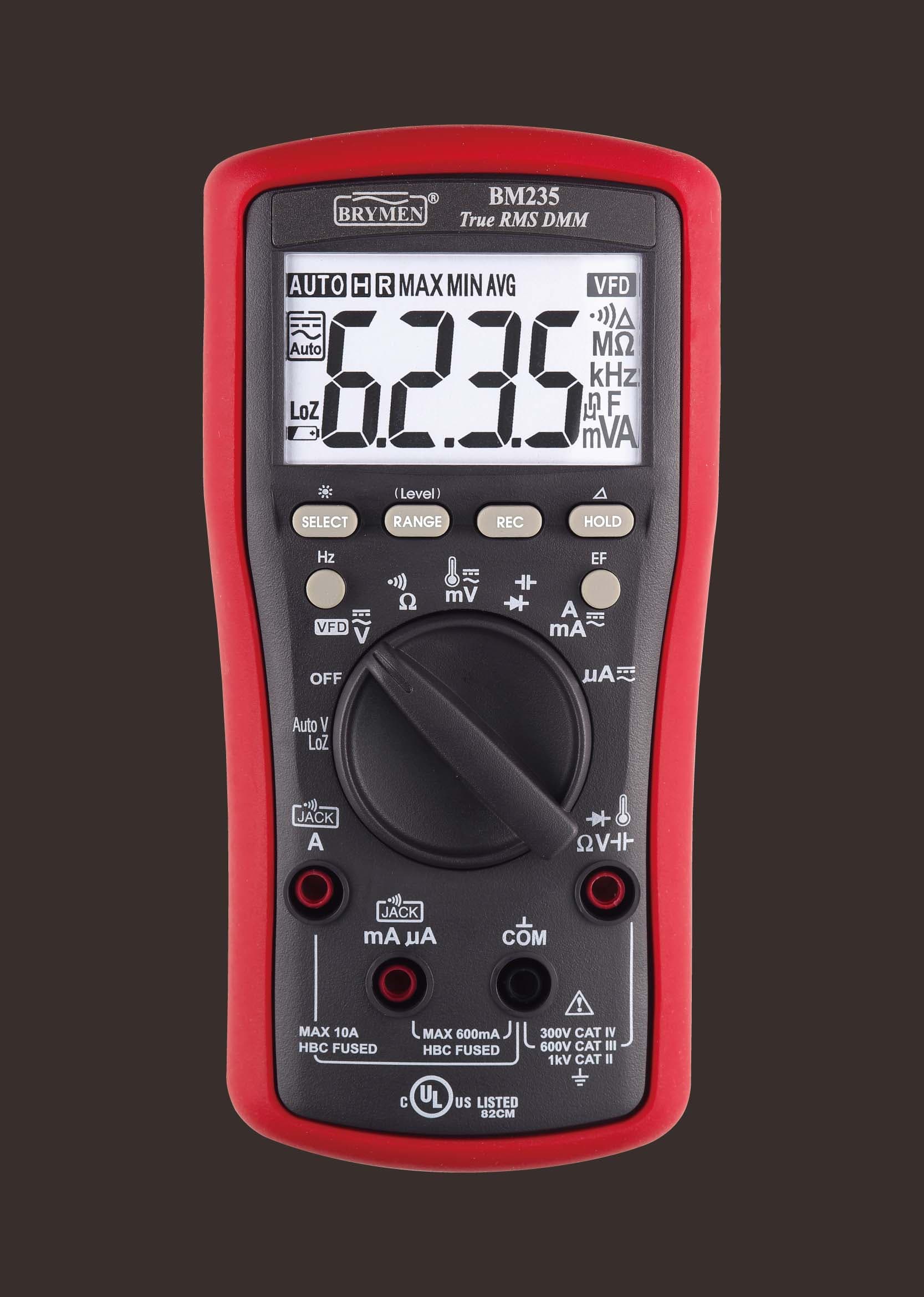 Brymen BM235Check pricePrice →Best Features for the Money4.6★★★★★
 - 7
 OWON OW18ECheck pricePrice →Best Budget µA Meter4.1★★★★☆
 - 8
 KAIWEETS HT118ECheck pricePrice →Cheapest 20,000-Count µA Meter4.2★★★★☆
 - 9
 KAIWEETS HT118ACheck pricePrice →Best Low-Cost True RMS4.4★★★★☆
 - 10
 Klein Tools MM420Check pricePrice →Best Budget Klein True RMS4.5★★★★★
Quick shopping
Compare at a glance
Swipe sideways on mobile to see every spec.
| Model | Award | Rating | Accuracy | Safety rating | Auto-ranging | |
|---|---|---|---|---|---|---|
 #1EEVblog Brymen BM786 #1EEVblog Brymen BM786 | Best Brymen for Electronics | 4.6★★★★★ | AC+DC True RMS, 0.03% DC V | CAT III 1000V / CAT IV 600V | Yes (manual override) | Check price → |
 #2UNI-T UT61E+ #2UNI-T UT61E+ | Best Budget Meter for Electronics | 4.5★★★★★ | True RMS, ±(0.05%+5) DC V | CAT III 1000V / CAT IV 600V | Yes (manual override) | Check price → |
 #3Fluke 287 #3Fluke 287 | Best Logging Meter for Electronics | 4.6★★★★★ | True RMS, 0.025% basic DC V | CAT IV 600V / CAT III 1000V | Yes (manual override) | Check price → |
| #4OWON B41T+ | Best Budget Bluetooth Logger | 4.2★★★★☆ | True RMS, ±(0.1%+2) DC V | 1000V CAT III (case marking) | Yes | Check price → |
| #5Fluke 87V✓ Tested | Best for Professionals | 4.8★★★★★ | True RMS | CAT III 1000V / CAT IV 600V | Yes | Check price → |
| #6Brymen BM235 | Best Features for the Money | 4.6★★★★★ | True RMS | CAT III 600V / CAT IV 300V | Yes (manual override) | Check price → |
| #7OWON OW18E | Best Budget µA Meter | 4.1★★★★☆ | True RMS, ±(0.1%+2) DC V | 1000V CAT III / 600V CAT IV (case marking) | Yes | Check price → |
| #8KAIWEETS HT118E | Cheapest 20,000-Count µA Meter | 4.2★★★★☆ | ±(0.08%+5) DC V; True RMS not stated | CAT III 1000V / CAT IV 600V | Yes | Check price → |
| #9KAIWEETS HT118A | Best Low-Cost True RMS | 4.4★★★★☆ | True RMS, 6,000-count | CAT III 1000V / CAT IV 600V | Yes | Check price → |
| #10Klein Tools MM420 | Best Budget Klein True RMS | 4.5★★★★★ | True RMS, 4,000-count | CAT III 600V | Yes (manual RANGE button) | Check price → |
In depth
Detailed reviews
EEVblog Brymen BM786
A 60,000-count Brymen with 0.01 µA and 0.01 Ω resolution and CAT IV 600V, for about a third of a Fluke 287.
Best for:Bench electronics and PCB repair
The BM786 is a Brymen meter made for the EEVblog: AC+DC True RMS, 60,000 counts, CAT III 1000V / CAT IV 600V, and 0.03% best DC voltage accuracy. Its 600.00 µA range resolves 0.01 µA at ±(0.075%+20 digits), and its 600.00 Ω range resolves 0.01 Ω. Brymen publishes a burden of 0.2 mV per µA, twice the BM235's, so in very low-voltage circuits it drops more voltage than you may expect. The BeepLit continuity responds in under 100 µs. It has no logging or PC link, but for hands-on bench work and PCB repair it's a strong all-rounder.
Why it fits: It leads because it combines 60,000 counts, 0.03% best DC accuracy, a 600.00 µA range at 0.01 µA and a continuity beeper that responds in under 100 µs, which is everything a microcontroller bench asks of a meter. The catch for sleep-current work is its 0.2 mV/µA burden, double the Fluke and BM235 figures.
- Accuracy
- AC+DC True RMS, 0.03% DC V
- Safety rating
- CAT III 1000V / CAT IV 600V
- Auto-ranging
- Yes (manual override)
- Best for
- Bench electronics and PCB repair
Reasons to buy
- +0.01 µA and 0.01 Ω resolution at 60,000 counts
- +Fast latching BeepLit continuity (<100 µs)
- +Relative zero, Max/Min/Avg and crest capture
Reasons to avoid
- −0.2 mV/µA burden is higher than the BM235's
- −No data logging or PC connection
UNI-T UT61E+
A budget 22,000-count True RMS meter with 0.01 µA and 0.01 Ω resolution, REL mode and a USB link.
Best for:Arduino, hobby electronics, PCB repair
The UT61E+ is UNI-T's 22,000-count version of the UT61+ series: True RMS, CAT III 1000V / CAT IV 600V, with a 220.00 µA range at 0.01 µA resolution and a 220.00 Ω range at 0.01 Ω (±0.5% + 10 digits). REL mode subtracts lead resistance, which UNI-T's manual tells you to do for low-ohm readings. It also adds capacitance to 220 mF, frequency to 220 MHz, hFE, NCV and a USB cable for PC readout. It has no temperature function (that's the UT61D+), and UNI-T doesn't publish its burden voltage.
Why it fits: A 220.00 µA range at 0.01 µA, ±(0.05%+5) on its lower DC voltage ranges and REL mode put it within reach of the BM786 for far less, and the included USB cable lets you watch readings on a PC while you edit code. UNI-T doesn't publish its burden voltage, which is why it sits second rather than first.
- Accuracy
- True RMS, ±(0.05%+5) DC V
- Safety rating
- CAT III 1000V / CAT IV 600V
- Auto-ranging
- Yes (manual override)
- Best for
- Arduino, hobby electronics, PCB repair
Reasons to buy
- +0.01 µA and 0.01 Ω resolution at a budget price
- +REL mode to zero test-lead resistance
- +USB PC link, capacitance to 220 mF, frequency to 220 MHz
Reasons to avoid
- −No temperature measurement
- −Burden voltage not published
Fluke 287
Fluke's electronics logging meter: 50,000 counts, 0.01 µA resolution and graphs on the meter, without the 289's industrial extras.
Best for:Electronics design, µA and logging
The 287 shares the 289's 50,000-count display, 500 µA range with 0.01 µA resolution, 100 mF capacitance and TrendCapture logging, and it carries the same CAT IV 600V / CAT III 1000V rating. It drops the 289's 50 Ω low-ohm range, LoZ and low-pass filter, so its finest resistance resolution is 0.01 Ω on the 500 Ω range (with relative mode to zero the leads). For bench electronics, sleep-current checks and logging a drifting supply overnight, it does the job for less than the 289.
Why it fits: Its 500 µA range resolves 0.01 µA at a published 102 µV/µA, and TrendCapture graphs readings on the meter, so you can see when a board wakes and how long it stays awake. It ranks third only because the cost is hard to justify for a hobby bench.
- Accuracy
- True RMS, 0.025% basic DC V
- Safety rating
- CAT IV 600V / CAT III 1000V
- Auto-ranging
- Yes (manual override)
- Best for
- Electronics design, µA and logging
Reasons to buy
- +0.01 µA resolution on the 500 µA range
- +On-screen trend logging with real-time clock
- +Limited lifetime warranty
Reasons to avoid
- −No 50 Ω low-ohm range (that's the 289)
- −Third-party seller and an Amazon listing with wrong CAT wording
OWON B41T+
A 22,000-count Bluetooth meter with 0.01 µA and 0.01 Ω resolution that logs 10,000 points by itself.
Best for:Logging µA sleep current on a budget
The B41T+ is OWON's 4½-digit (22,000-count) True RMS meter. Its 220 µA range resolves 0.01 µA and its 220 Ω range resolves 0.01 Ω, both at ±(0.5% + 10 digits), and relative mode zeroes the leads. Bluetooth 4.0 sends readings to a phone app, and the "+" model records up to 10,000 points over as long as 168 hours with no phone attached, so it can log a project's sleep current overnight. OWON doesn't state a CAT rating on its page (the case says 1000V CAT III), AC voltage tops out at 750 V and burden voltage isn't published.
Why it fits: Offline recording of up to 10,000 points over as long as 168 hours, with no phone attached, makes it the easiest budget way to log a battery-powered sensor's sleep current overnight. It has the same 0.01 µA and 0.01 Ω resolution as the UT61E+, but OWON gives no burden voltage or CAT rating on its page.
- Accuracy
- True RMS, ±(0.1%+2) DC V
- Safety rating
- 1000V CAT III (case marking)
- Auto-ranging
- Yes
- Best for
- Logging µA sleep current on a budget
Reasons to buy
- +0.01 µA and 0.01 Ω resolution
- +Offline logging of 10,000 points without a phone
- +Bluetooth app, capacitance to 220 mF, temperature
Reasons to avoid
- −OWON publishes no CAT rating or burden voltage
- −AC voltage limited to 750 V
Fluke 87V
The step-up pick for anyone who needs CAT IV protection and high-resolution readings daily.
Best for:Industrial technicians, daily professional use
The 87V is Fluke's industrial-grade step up from the 117 — a 1000V CAT III / 600V CAT IV rating, a 6,000-count main display with a 19,999-count high-resolution mode, and a 32-segment analog bar graph for watching signals change in real time.
Why it fits: It carries our Hands-on Tested badge, and its 600.0 µA range reads 0.1 µA (0.01 µA in the 19,999-count HiRes mode) with a typical burden of 100 µV/µA. It's a big, expensive industrial meter for a breadboard, so it ranks behind the finer-resolution bench meters unless you also work on mains equipment.
- Accuracy
- True RMS
- Safety rating
- CAT III 1000V / CAT IV 600V
- Auto-ranging
- Yes
- Best for
- Industrial technicians, daily professional use
Reasons to buy
- +Joint-highest CAT rating in this list (CAT IV 600V / CAT III 1000V)
- +19,999-count high-resolution mode
- +Analog bar graph tracks fast-changing signals
Reasons to avoid
- −Among the most expensive picks here
- −Overkill for casual home use
Brymen BM235
True RMS with AutoV LoZ, NCV, VFD mode and temperature: more electrician features than most meters at its price.
Best for:Electricians and enthusiasts who want every feature
Brymen's BM235 packs features usually found on pricier meters: True RMS, a 6,000-count backlit display, AutoV low-impedance voltage, non-contact voltage detection, a VFD mode for variable-speed drives, Type-K temperature, Max/Min/Avg and relative zero, with 1000V-rated HBC fuses. Brymen's catalog and the meter's own markings give CAT III 600V and CAT IV 300V. The US listing is the EEVblog edition, and support runs through Brymen's distributors rather than a big US brand.
Why it fits: Brymen's catalog gives 0.1 mV/µA burden on its 600.0 µA range, among the lowest here, and its BeepLit continuity reacts in under 15 ms. At 6,000 counts it can't match the resolution of the meters above it, but it's a sensible pick for anyone who also wants LoZ and NCV for household wiring.
- Accuracy
- True RMS
- Safety rating
- CAT III 600V / CAT IV 300V
- Auto-ranging
- Yes (manual override)
- Best for
- Electricians and enthusiasts who want every feature
Reasons to buy
- +AutoV LoZ and NCV built in
- +VFD voltage and frequency mode
- +Max/Min/Avg, relative zero and Type-K temperature
Reasons to avoid
- −CAT IV only to 300V, below the Fluke 179 and Klein MM700
- −Less familiar brand in the US; Amazon listing is the EEVblog edition
OWON OW18E
A budget True RMS meter with a 200.00 µA range, 0.01 Ω resolution, Bluetooth and offline logging.
Best for:Arduino and hobby electronics on a budget
The OW18E is a 19,999-count (sold as 20,000) True RMS meter. Its 200.00 µA range resolves 0.01 µA at ±(0.5% + 10 digits) DC and its 200.00 Ω range resolves 0.01 Ω. It adds NCV, a flashlight, Type-K temperature, capacitance to 20 mF and a 20 A range, plus BLE 4.0 and offline recording on the E model. The case is marked 1000V CAT III / 600V CAT IV, but OWON's page doesn't state a rating and doesn't publish burden voltage. Amazon showed only one in stock when we checked.
Why it fits: A 200.00 µA range at 0.01 µA, 0.01 Ω resolution and Bluetooth with offline recording on a low-cost body make it a strong hobby meter. It ranks below the B41T+ because OWON publishes less about it, and Amazon had very little stock when we checked.
- Accuracy
- True RMS, ±(0.1%+2) DC V
- Safety rating
- 1000V CAT III / 600V CAT IV (case marking)
- Auto-ranging
- Yes
- Best for
- Arduino and hobby electronics on a budget
Reasons to buy
- +0.01 µA and 0.01 Ω resolution at a budget price
- +Bluetooth with offline recording
- +NCV, flashlight and temperature included
Reasons to avoid
- −Low stock on Amazon at last check
- −OWON publishes no burden voltage or CAT rating
KAIWEETS HT118E
A budget 20,000-count meter with a 200 µA range (KAIWEETS doesn't claim True RMS) and no relative mode for low-ohm work.
Best for:Beginner Arduino and µA checks
The HT118E has a 20,000-count display, CAT III 1000V / CAT IV 600V and a 200 µA range at ±(0.5% + 5 digits) DC. At 20,000 counts that implies 0.01 µA resolution, though KAIWEETS doesn't print it. It covers temperature, capacitance, frequency, NCV and continuity, with lit input jacks and a flashlight. Its 200 Ω range is only ±(1.0% + 15 digits) and KAIWEETS lists no relative mode, so you have to subtract lead resistance yourself. That makes it better for sleep-current checks than for milliohm work.
Why it fits: Its 200 µA range on a 20,000-count display implies 0.01 µA steps, at ±(0.5%+5) DC, which is enough to see a sleeping ATmega's current clearly. KAIWEETS lists no relative mode or burden voltage, so it ranks behind the OWONs for careful current work.
- Accuracy
- ±(0.08%+5) DC V; True RMS not stated
- Safety rating
- CAT III 1000V / CAT IV 600V
- Auto-ranging
- Yes
- Best for
- Beginner Arduino and µA checks
Reasons to buy
- +200 µA range with 20,000 counts at a budget price
- +CAT III 1000V / CAT IV 600V
- +Lit input jacks, NCV and flashlight
Reasons to avoid
- −No relative mode listed for zeroing test leads
- −Per-range resolution and burden voltage not published
KAIWEETS HT118A
True RMS, CAT III 1000V and µA current with NCV and temperature at a low price.
Best for:Budget all-rounder for home, car and hobby
The HT118A is a 6,000-count, auto-ranging True RMS meter with an analog bar. KAIWEETS's manual rates it CAT III 1000V / CAT IV 600V for up to 1000V DC and 750V AC, and current runs from a 600 µA range (0.1 µA) to 10 A. It also measures resistance to 60 MΩ, capacitance, frequency to 10 MHz, duty cycle and temperature, and adds NCV, a Live-wire test, Min/Max, jack lights, a flashlight and a kickstand. KAIWEETS gives a 3-year warranty. Its own product page lists 600V AC/DC, which disagrees with the manual and the meter face.
Why it fits: Frequency to 10 MHz and duty cycle let you confirm a PWM pin's setting, and the 600 µA range reads to 0.1 µA. The 6,000-count display and coarser µA steps place it near the bottom for sleep-current checks.
- Accuracy
- True RMS, 6,000-count
- Safety rating
- CAT III 1000V / CAT IV 600V
- Auto-ranging
- Yes
- Best for
- Budget all-rounder for home, car and hobby
Reasons to buy
- +µA, mA and 10 A ranges
- +NCV, temperature and Min/Max included
- +3-year warranty
Reasons to avoid
- −Maker's product page and manual disagree on max voltage
- −Bulky compared with slim meters
Klein Tools MM420
Klein's everyday True RMS, auto-ranging meter: µA to 10 A, temperature and capacitance, rated CAT III 600V.
Best for:Home electrical, HVAC and appliance work
The MM420 is a 4,000-count, True RMS, auto-ranging meter rated CAT III 600V. It measures AC/DC current from a 400.0 µA range (0.1 µA resolution) up to 10 A, resistance to 50 MΩ, capacitance to 400 µF, frequency to 50 kHz and temperature from -40 to 1832°F with the included thermocouple. Lead-Alert lights show which jacks to use, it has Min/Max, a backlight and a 2 m drop rating. There's no LoZ mode or NCV, and Klein rates it for indoor use only.
Why it fits: Lead-Alert lights showing which jacks to use are a real help when you switch between volts and µA many times a session, and the 400.0 µA range reads to 0.1 µA. With 4,000 counts and capacitance only to 400 µF, it has the least resolution of the ten.
- Accuracy
- True RMS, 4,000-count
- Safety rating
- CAT III 600V
- Auto-ranging
- Yes (manual RANGE button)
- Best for
- Home electrical, HVAC and appliance work
Reasons to buy
- +µA, mA and 10 A ranges on AC and DC
- +Temperature, capacitance and frequency included
- +Lead-Alert jack lights help beginners
Reasons to avoid
- −No LoZ mode or non-contact voltage detection
- −CAT III 600V only, not for service-entrance work
Before you buy
Buying advice
Match the µA range to the sleep current you expect
A bare ATmega or ESP32 module in deep sleep can draw single-digit microamps, while a development board with a USB chip and power LED may draw milliamps even when asleep. A meter with a 200 to 600 µA range and 0.01 µA steps resolves the first case; a 0.1 µA meter is fine for the second. If you only ever measure milliamps, the cheaper meters lower in the list are enough.
Think about burden before trusting a current reading
Burden is the voltage the meter steals from your circuit. Multiply the reading by the published figure: 300 µA on a 0.2 mV/µA meter is 60 mV, while on a 100 µV/µA meter it is 30 mV. If the board resets or behaves differently with the meter in line, switch up a range, which lowers the drop, or use a meter with a lower published burden.
Use logging for battery-life estimates
A board that sleeps for a minute and wakes for 200 ms has an average current no single reading shows. Meters that record over time, such as the OWON B41T+, OWON OW18E and Fluke 287, let you see the pattern and estimate battery life. For the fast wake-up spikes themselves, a scope across a small shunt resistor is still the better tool.
Don't overpay for safety ratings you won't use, but don't ignore them
Arduino projects run on 5 V and 3.3 V, so a CAT IV rating adds little on the bench. It matters the day you check a mains power supply or a relay board switching household loads. If your projects ever touch mains, choose one of the meters here with a published CAT III or CAT IV rating, and keep the cheap meter for the breadboard.
Methodology
How we chose
We ranked these ten for microcontroller and circuit board work: microamp range and resolution first, then published burden voltage, display counts and DC accuracy, then continuity speed, diode test and extras such as logging. Every figure comes from the maker's manual, datasheet or product page; the ranking is desk research, and only the Fluke 87V carries our Hands-on Tested badge.
Picks marked "Hands-on Tested" have been bought and tested by us; the rest are desk research. A pick only carries that badge once we have actually bought and tested that unit. More on how we research.
Questions
Frequently asked questions
What multimeter features do I need for Arduino projects?+
Start with auto-ranging DC volts, continuity, a diode test and a microamp current range. Those cover checking a 5 V or 3.3 V rail, finding broken jumper wires, testing LEDs and measuring how much current a sketch draws in sleep. Capacitance and frequency are useful extras. Meters such as the UNI-T UT61E+ and EEVblog Brymen BM786 add the fine resolution that makes those readings trustworthy.
How do I measure the sleep current of an Arduino or ESP32?+
Break the supply line and put the meter in series, with the red lead in the µA/mA jack and the dial on the lowest µA range. Let the board enter sleep before reading, because start-up and Wi-Fi bursts can be hundreds of milliamps and may blow the µA fuse. Some makers short the meter with a jumper during boot, then remove it once the board sleeps.
What is burden voltage and why does it matter on a 3.3 V board?+
Burden voltage is the drop across the meter's internal shunt when it measures current. Brymen publishes 0.2 mV per µA for the BM786, so a 500 µA reading costs 100 mV of the board's supply. On a 3.3 V rail with little headroom that can change behavior or trigger a brown-out reset, so a lower-burden meter or a higher range helps.
Is a cheap multimeter good enough for Arduino work?+
For checking that 5 V is present and wires are connected, yes. Budget meters start to struggle with sleep-current work, because many lack a µA range or only resolve 0.1 mA. The KAIWEETS HT118E and OWON OW18E are among the cheaper meters here that still offer a 200 µA range with 20,000-count displays.
Do I need True RMS for electronics and Arduino projects?+
Rarely for the board itself, since most readings are DC. True RMS matters when you measure AC from a transformer or a distorted waveform. Be aware that a multimeter set to DC volts shows the average of a PWM signal, not its peak; for the shape of the waveform you need an oscilloscope. All ten meters here are True RMS on AC volts.
Can a multimeter replace an oscilloscope for Arduino debugging?+
No. A meter reads steady values: rail voltages, resistance, average current, frequency and duty cycle. It cannot show a glitch, the timing of an I2C transaction or ringing on a fast edge. Many hobbyists buy a good meter first and add a scope when serial buses or motor drivers misbehave; see our oscilloscope guide for Arduino projects.


