HOW-TO GUIDE
Why Is There No Signal on One Oscilloscope Channel?
By the OhmSavvy Research Team ·

Why one channel is easier than none
A scope that shows nothing on every channel could be wrong in a dozen places, which is why the all-channels flat line has its own checklist. One silent channel next to a working one is a much better position to be in. The working channel proves the scope powers up, acquires and displays, and that your circuit really does have a signal on it. The fault must be in the few things that are unique to the silent channel: its settings, its probe, or its own input circuitry. Comparing the good channel with the bad one, piece by piece, finds it quickly.
Causes, checks and fixes
| Symptom | Likely cause | How to check | Fix |
|---|---|---|---|
| No CH2 trace or label at all | Channel off or hidden | Look for a lit channel button and the channel label | Turn the channel on |
| CH2 flat line at its marker | Ground coupling, or volts/div far too large | Compare coupling and V/div with CH1 | DC coupling; match CH1's V/div |
| Only an edge arrow for CH2 | Offset or position pushed it off-screen | Read the offset value in the channel menu | Zero the offset |
| CH2 ten times too small | Probe ratio set to 1x with a 10x probe | Compare the channel menu with the probe switch | Match the ratio |
| CH2 frozen when CH1 is idle | Trigger source is CH1 in Normal mode | Read the trigger readout | Trigger on CH2, or use Auto |
| Fault moves with the probe | Broken probe tip, cable or ground | Meter the probe: tip to pin, clip to shell | Replace the probe |
| Fault stays on the channel, any probe | Damaged BNC or front end | Calibration output on each channel at the same settings | Self-calibrate, then service |
| One V/div range dead, others fine | Failed attenuator relay or path | Step through every V/div setting on the calibration output | Service |
| Self-calibration fails on one channel | Hardware fault in that channel | Read the self-calibration result | Contact the maker or a repair service |
1Swap probes and channels to isolate the fault
Use the scope's calibration output as the signal, because it is always present and you know what it should look like; it is often a square wave of around 3 V at 1 kHz, with the exact values printed beside the terminal. Then run the four combinations below. Each takes seconds and between them they point clearly at either the probe or the channel.
01
Default setup
Rules out any odd setting at once
02
Good probe → bad channel
Trace appears? The old probe is faulty
03
Bad probe → good channel
Still flat? Confirms the probe
04
Good probe, still flat
Channel fault: settings, then hardware
05
Self-cal, then service
Fails or stays dead? Send it in
| Probe A on CH1 | Probe B on CH1 | Probe A on CH2 | Probe B on CH2 | Verdict |
|---|---|---|---|---|
| Works | Flat | Works | Flat | Probe B is faulty |
| Works | Works | Flat | Flat | CH2 settings or CH2 hardware |
| Works | Works | Works | Works | Intermittent: a loose BNC or circuit connection |
Before running the swap, save your setup if it took effort to build, then use the Default Setup button. It returns every channel to identical settings in one press, which removes the most common cause before you start. If the trace returns after a default setup, the problem was a setting, and step 3 shows which ones to look at next time.
2Check the channel is on and visible
On most scopes, each channel button lights in that channel's color when it is on, and the screen shows a numbered marker at the left edge for each active trace. A channel that is off draws nothing at all, and on some models Autoset switches off channels where it finds no signal, so a probe added afterward stays invisible. Also check that the trace isn't hiding behind another one: two channels at the same position, volts/div and signal draw directly on top of each other, and only the trace drawn last is visible. Nudge the position of each channel apart to see both.
3Compare the silent channel's settings with the working one
Each channel has its own vertical menu, and it is easy to change one and forget. Open both menus and go down them line by line. The table shows how each setting can make a perfectly good signal look absent on one channel only. Where your scope has a copy or apply-to-all function for channel settings, use it; if not, the default setup does the same job.
| Setting | Working CH1 | Silent CH2 (example) | What it does to a 1 V signal |
|---|---|---|---|
| Volts/div | 500 mV/div | 10 V/div | 1 ÷ 10 = 0.1 div tall, looks flat |
| Offset | 0 V | +3 V at 500 mV/div | 3 ÷ 0.5 = 6 div up, past the 4-div top edge |
| Coupling | DC | GND | Input disconnected, flat line by design |
| Probe ratio | 10x | 1x (10x probe fitted) | Drawn as 0.1 V, ten times too small |
| Bandwidth limit | Off | 20 MHz on | Fast edges shrink and round off |
| Invert | Off | On | Trace flipped upside down, not missing |
| Input impedance | 1 MΩ | 50 Ω | High-impedance source loaded to a few millivolts |
The offset row catches many people. The screen is eight divisions tall, so at 500 mV/div it shows only ±2 V around the center line; an offset of 3 V puts the trace six divisions up, well outside it, and all you see is a small arrow at the edge. The bandwidth limit does not normally make a trace vanish, but a single-pole 20 MHz limit passes only about 1 ÷ √(1 + 2.5²) ≈ 37% of a 50 MHz sine, which can make a fast clock look like a weak, rounded copy of the same clock on CH1. Invert never hides a trace; it only flips it, which can look like a different signal. If CH2 is set to a 50 Ω input, which not every scope offers, switch it back to 1 MΩ for passive probes.
4Rule out the trigger-channel confusion
The trigger source never hides a trace, but it can make one channel look dead. In Normal mode the scope redraws every channel only when the trigger source produces a valid event. With the source on CH1 and nothing connected there, CH2 freezes on an old capture or stays blank, even though its own signal is perfectly healthy. The reverse also happens: the trigger works and CH1 is stable, but CH2 carries an unrelated signal, so it drifts on screen while CH1 holds still. Set the trigger source to the channel you care about, or use Auto while diagnosing. If the trigger itself refuses to fire on any channel, the fixes are in why an oscilloscope trigger is not working.
5Test the probe with a multimeter
If the fault follows the probe, confirm it with a meter before throwing the probe away. Unplug it from the scope and set the meter to resistance. Measure from the probe tip to the BNC center pin; a BNC-to-banana adapter makes the center pin easy to reach. A 10x passive probe typically reads close to 9 MΩ, because a 9 MΩ resistor in the probe forms the 10:1 divider with the scope's 1 MΩ input. Expect a few percent either way, and check that your meter has a range that goes above 9 MΩ. On a switchable probe set to 1x, the reading should be low; many probes use a resistive center wire, so a few ohms up to a few hundred ohms is normal, but OL is not.
Next, measure from the ground clip to the BNC outer shell, which should read close to zero, typically well under 1 Ω. Repeat both tests while gently flexing the cable near the probe head and near the BNC, where the fine center conductor usually breaks; a reading that jumps to OL as you flex is a broken wire. Also look at the tip itself, since a bent or snapped tip can leave the hook clip sliding on plastic.
Bars use a logarithmic scale: each step is ten times the last.
The chart shows how far apart the healthy readings are, which is why the test is so decisive: a 10x probe reading OL, or a ground path reading thousands of ohms, cannot be mistaken for a good one. A probe that passes both tests but still misbehaves may only need compensating to its new channel, as described in how to compensate an oscilloscope probe. Correct connection habits are in how to connect an oscilloscope probe correctly.
6Check for a damaged BNC or front end
If a known-good probe still shows nothing on one channel at default settings, look at the hardware. Start with the BNC socket: a loose socket that wobbles, or a bayonet that no longer locks, can break the center or ground connection inside. Then think back to whether that input ever saw too much voltage. Each channel has its own attenuator, protection components and amplifier, so a single overvoltage event can kill one channel and spare the rest. Bench scope inputs are typically rated for a few hundred volts at 1 MΩ and much less on a 50 Ω input; the exact figure is printed next to the BNC and in the manual. Remember that a 1x probe passes the full voltage to the input, while a 10x probe divides it by ten.
Probe the calibration output on each channel in turn at identical settings and compare. Typical signs of a damaged front end are a trace stuck at the top or bottom of the screen whatever the position, an offset that won't return to zero, a calibration signal much smaller than the other channels show, a baseline far noisier than its neighbors, or one or two volts/div settings that show nothing while the rest work. That last one points at a failed attenuator relay; on many scopes you can hear these relays click as you turn the volts/div knob, and a channel that goes silent at the same settings every time has a fault in that path.
7Run self-calibration
Most digital scopes have a self-calibration routine in the utility or system menu. It measures each channel's internal offset and gain and stores corrections, which can cure a channel that reads slightly off-center or slightly low after a temperature change or a firmware update. Follow the manual: typically you warm the scope up for around 20 to 30 minutes, disconnect everything from the inputs, and let the routine run for several minutes without touching anything. What self-calibration cannot do is repair a damaged part. If it reports a failure on one channel, or completes but the channel still shows no calibration signal, you have strong evidence of a hardware fault and should stop trying settings.
8Decide whether to send it for service
Send the scope for service when a known-good probe shows nothing on one channel after a default setup, when self-calibration fails on that channel, or when the front end shows the damage signs in step 6. If the scope is under warranty, contact the maker before opening it, since opening the case can affect coverage and the power supply inside holds hazardous voltages. Out of warranty, weigh the repair quote against the scope's value: on an entry-level model a front-end repair can approach the price of a new unit. On a four-channel scope you can usually keep working with the remaining inputs in the meantime; label the faulty one so nobody trusts its readings.
Safety: overvoltage, mains, and shared ground clips
In short
A four-channel scope gives you spare inputs for the swap test and keeps you working if one channel ever needs repair. All three below have four channels; compare them in our best beginner oscilloscopes roundup.
Four-channel scopes in our reviews
Hands-on tested. 50MHz, 4 channels, 1 GSa/s and a large 7-inch display.

Hands-on tested. 100MHz, 4 channels, 1 GSa/s, with a well-regarded UI.
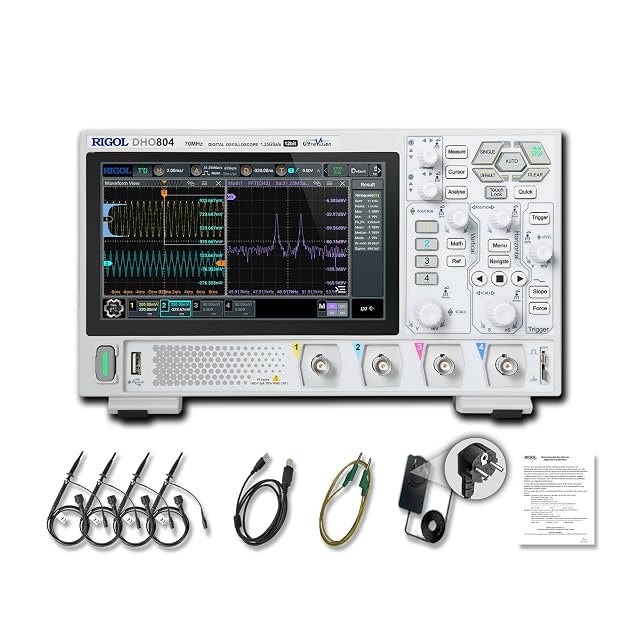
Hands-on tested. 70MHz, 4 channels, 12-bit, USB-C powered.
As an Amazon Associate I earn from qualifying purchases. Prices and availability are shown on Amazon.
Frequently asked questions
Why does channel 2 on my oscilloscope not work when channel 1 does?
Usually CH2 is switched off, set to ground coupling, at a very different volts/div or offset, or set to the wrong probe ratio, or its probe is faulty. Move CH1's probe to CH2 and probe the calibration output. If a waveform appears, the old CH2 probe is bad. If not, restore the default setup and try again before suspecting the hardware.
How do I test an oscilloscope probe with a multimeter?
Unplug the probe and set the meter to resistance. Measure from the tip to the BNC center pin: a 10x probe typically reads close to 9 MΩ, and a 1x setting reads low. Then measure from the ground clip to the BNC shell, which should be close to zero ohms. OL on either test, or a reading that jumps when you flex the cable, means a broken conductor.
Can too much voltage damage just one oscilloscope channel?
Yes. Each channel has its own attenuator, protection parts and amplifier, so an overvoltage on one input can damage that channel and leave the others working. Typical signs are a trace stuck at the top or bottom, an offset that will not zero, a much smaller calibration signal than the other channels, or one volts/div range that shows nothing while the rest work.
Will self-calibration fix a dead oscilloscope channel?
No. Self-calibration measures and corrects small gain and offset errors in working circuitry, so it can tidy a channel that reads slightly high or off-center. It cannot repair a burned resistor, a failed relay or a damaged amplifier. If a channel fails self-calibration, or still reads wrong afterward, treat that as evidence of a hardware fault and contact the maker or a repair service.
Why does my second channel only update when the first one has a signal?
The trigger is probably set to CH1 in Normal mode. The scope draws every channel only when the trigger channel produces a valid event, so with nothing on CH1, CH2 freezes or stays blank even though its own signal is fine. Set the trigger source to CH2, or switch to Auto, and the second trace will update normally.
Do I need to recompensate a probe when I move it to another channel?
Yes, ideally. Each channel's input capacitance differs slightly, and probe compensation matches the probe to one particular input. After moving a 10x probe to a different channel, connect it to the calibration output and check the square wave's corners. Adjust the trimmer if they are rounded or peaked. It takes a minute and keeps edges and amplitudes accurate on the new channel.
Where to go next
Why Does My Oscilloscope Show a Flat Line? →
When every channel is flat, not just one.
How to Compensate an Oscilloscope Probe →
Match a probe to its channel after swapping it.
Why Is My Oscilloscope Trigger Not Working? →
When the scope sits on Wait and never captures.
Why Does My Oscilloscope Waveform Look Distorted? →
When the signal is there but its shape is wrong.

