HOW-TO GUIDE
How to Measure the Settling Time of a Signal With an Oscilloscope
By the OhmSavvy Research Team ·

What settling time actually means
Settling time is the interval from a reference moment, usually the instant the input step is applied, until the output enters an error band around its final value and never leaves it again. The band is a tolerance such as ±1% or ±0.1% of the final value, or of the step size. The phrase "never leaves again" matters: a ringing output may pass through the band several times before it finally stays inside, and only the last entry counts. Our overshoot and ringing guide has a short section on reading settling from a normal-scale capture; this page goes further, into the small bands that need zooming.
Choosing the error band
The band decides everything that follows, because it sets how small a voltage you must be able to see. Use the figure from the datasheet you are checking against, or work back from what the next stage needs. The table converts common bands into millivolts for two step sizes.
| Error band | 5 V step | 1 V step | Where it is used |
|---|---|---|---|
| ±1% | ±50 mV | ±10 mV | Regulators, control loops, general analog stages |
| ±0.2% (½ LSB, 8-bit) | ±10 mV | ±2 mV | Settling for an 8-bit DAC or ADC driver |
| ±0.1% | ±5 mV | ±1 mV | Common op-amp datasheet condition |
| ±0.012% (½ LSB, 12-bit) | ±0.6 mV | ±0.12 mV | 12-bit data converters; needs special techniques |
1Drive a clean, repeatable step
You need the same step over and over so the scope can trigger and average. For an amplifier, a function generator square wave at a low frequency works well: make the period long enough that the output fully settles before the next edge, with plenty of flat time to spare. For a DAC, have the firmware toggle between two codes in a loop and drive a spare GPIO high at the same moment as a trigger marker. For a regulator, switch a resistive load on and off with a MOSFET driven by the generator, and trigger on the gate signal. Check that the source's own edge settles faster than the thing you are measuring, otherwise you are timing the generator.
2Check the probe before trusting a slow tail
A passive 10x probe is a compensated divider. If its trimmer is off, every step gains a slow exponential error that decays over the probe's own time constant, which on a long timebase looks exactly like a circuit that takes ages to settle. Before anything else, compensate the probe on the scope's calibrator output, and use the short ground spring at the measurement point so ground-lead ringing does not get added to the real ringing.
Bandwidth matters too. A scope and probe have their own step response, roughly a rise time of 0.35 divided by the bandwidth, plus whatever small overshoot their front end adds. If the circuit settles in a time comparable to that, part of what you measure belongs to the instrument.
3Trigger on the input step, not the output
Put the trigger source on CH2 (the input step or the GPIO marker) with a rising or falling edge to match the step you want to study, and use Normal mode. The input edge is clean and fast, so the trigger point stays put from one capture to the next; triggering on the slow, ringing output would wander. Move the trigger point toward the left side of the screen so most of the display shows what happens after the step, and choose a timebase where the whole settling process fits in roughly half the screen.
4Zoom in vertically on the final value
At a scale that fits the whole step, a ±0.1% band is thinner than the trace. You have to magnify the region around the final value. Set CH1 to DC coupling, then use the channel offset (vertical position in volts) to bring the final value to the center line, and increase the sensitivity until the error band spans a few divisions. The step itself now goes off the top or bottom of the screen, and only the tail is visible.
Watch for overdrive recovery
5Average out the noise
At high sensitivity, random noise thickens the trace until the band edges are hard to judge. Switch the acquisition mode to Average with 16 to 64 sweeps. Because the step repeats exactly and the trigger is locked to the clean input edge, the real waveform adds up identically each time while random noise cancels, so the tail sharpens. A high-resolution acquisition mode, on scopes that have one, does a similar job by averaging adjacent samples within a single capture. Neither removes interference that is synchronous with the step, such as switching noise from the same clock.
6Read the settling time with cursors
Stop the acquisition. Set two horizontal voltage cursors at the top and bottom of the error band (final value plus and minus the tolerance) so the band is marked on screen. Then put the first vertical time cursor on your reference, either the input step or the output's 50% crossing, and slide the second to the point where the trace last enters the band. The Δt readout is the settling time. Note the band, the step size and the reference you used next to the number, because a settling time without them cannot be compared to anything.
| Record | Example entry | Why it matters |
|---|---|---|
| Step size and direction | 0 V to 2 V, rising | Rising and falling steps often settle differently |
| Error band | ±0.1% of final value | A tighter band always gives a longer time |
| Reference point | Input step edge | Changes the result by the delay plus slew time |
| Load | 2 kΩ with 100 pF | Capacitive load usually lengthens ringing |
| Scope settings | Average 32, 20 MHz limit off | Shows how noise and bandwidth were handled |
Vertical resolution sets a floor
An 8-bit converter, common on entry-level scopes, splits the screen height into about 256 levels. With 8 vertical divisions that is roughly 32 levels per division, so the smallest step the scope can show is about the V/div setting divided by 32. Assuming the full range spans the graticule (some scopes keep a margin, which makes each step a little coarser), the chart shows why the zoom in step 4 is not optional.
Bars use a logarithmic scale: each step is ten times the last.
At 1 V/div a ±5 mV band is smaller than one converter step and cannot be resolved at all; at 10 mV/div with offset it spans a full division. Averaging can resolve detail a little finer than one step when there is some noise to dither the signal, but it cannot recover a band that is buried many times below the step size.
Scopes suited to settling work
Two features matter most here. Vertical resolution decides how finely the zoomed error band is sliced: a 12-bit converter divides the screen into 4,096 levels instead of 256, so each step is sixteen times smaller and a tight band stays visible without leaning so hard on averaging. A second channel matters almost as much, because triggering on the clean input step and timing from it is the most repeatable way to start the clock. Bandwidth only has to be comfortably above the ringing frequency you expect; tens of megahertz cover most op-amp, DAC and regulator work.
Scopes for timing a step response
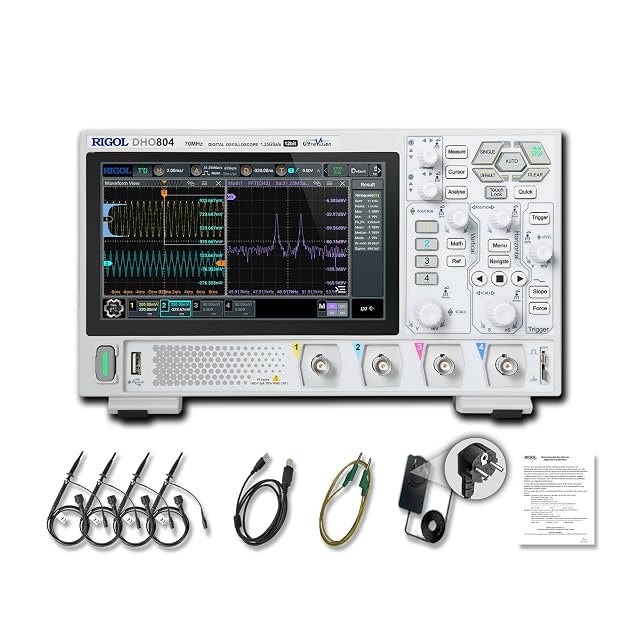
12-bit resolution and 70MHz, so a millivolt-scale band around the final value is cut into far finer steps.
100MHz and four channels: input step, output and a GPIO marker can all share the screen.

50MHz and four channels; with averaging and offset it handles the looser settling bands well.
As an Amazon Associate I earn from qualifying purchases. Prices and availability are shown on Amazon.
Troubleshooting a settling-time measurement
| Symptom | Likely cause | Fix |
|---|---|---|
| Long, slow tail that changes when you touch the probe trimmer | Probe miscompensation | Compensate on the calibrator and re-measure |
| Tail shape changes with V/div setting | Front-end overdrive recovery | Reduce overdrive or use a clamp or error-amplifier method |
| Band edges lost in a fuzzy trace | Random noise at high sensitivity | Use Average or high-resolution mode |
| Averaged trace looks smeared | Trigger on the noisy output | Trigger on the clean input step or a GPIO marker |
| Fast ringing that disappears with the ground spring | Long ground lead resonance | Keep the short ground connection |
| Offset control will not reach the final value | Offset range limited at that V/div | Use a less sensitive setting or subtract a reference on another channel |
Mind the input limits when zooming
Frequently asked questions
Is settling time measured from the input step or from the output edge?
It depends on the convention, so always state it. Op-amp and DAC datasheets usually start the clock when the input step is applied, which means delay and slewing are included. Some control and logic contexts start from the output's 50% crossing instead. A two-channel capture, input on one channel and output on the other, lets you report either.
Why is my settling time longer than the datasheet figure?
Check the test conditions first: datasheet numbers assume a particular step size, load, gain and error band, and a larger step or heavier capacitive load usually settles more slowly. Then rule out the measurement itself. A miscompensated probe, a long ground lead or front-end overdrive recovery can all add a tail that is not in the circuit.
Can I measure 0.01% settling with an ordinary 8-bit scope?
Not directly on a large step. One converter step is roughly 1/256 of the full screen height, so even at high sensitivity you run into overdrive problems the moment the step itself goes off screen. Precision settling is normally measured with a clamped or false-summing-node arrangement that only passes the small error signal to the scope.
Does averaging change the settling time I measure?
Averaging reduces random noise without moving the waveform in time, provided the trigger is stable and the step repeats identically. If the trigger jitters, averaging smears the edge and the ringing, which can make settling look slightly different. Keep the trigger on the clean input step rather than on the noisy output.
What is a sensible error band if the datasheet does not give one?
Tie it to what the next stage can tolerate. For a DAC feeding an ADC, half an LSB of the converter resolution is a common choice. For a power rail, the regulation tolerance the load needs, such as a few percent, is more meaningful than a tight analog band.

