HOW-TO GUIDE
Why Does My Oscilloscope Waveform Look Distorted?
By the OhmSavvy Research Team ·
Scope-made or real? The one-change test
Every waveform you see has passed through five stages: the circuit node, the probe, the scope's analog front end, the analog-to-digital converter and the display processing. Each stage can bend the shape in its own recognizable way, and only the first one is the distortion you actually want to find. The fastest way to sort them is to change exactly one part of the measurement at a time and see whether the odd shape follows the change. Swap the probe, flip 1x to 10x, double the time/div, turn the bandwidth limit off: a real circuit defect ignores all of that, while a measurement artifact moves, shrinks or vanishes.
Before you start, it helps to name the shape. Rounded corners, a sloping top, spikes on every edge, ringing that dies away, a sine where you expected a square, a jagged staircase, flat-topped peaks and a trace whose frequency changes as you turn the timebase knob each point to a different stage. The table below maps those shapes to causes; the numbered steps then work through the checks in the order that finds the common faults soonest.
Causes, checks and fixes
| Symptom | Likely cause | How to check | Fix |
|---|---|---|---|
| Rounded corners or spikes on every edge of a square wave | Probe not compensated | Probe the calibration output and look at the top | Adjust the probe trimmer until the top is flat |
| Square wave looks like a sine, edges slow | Bandwidth too low for the edge rate | Estimate rise time: 0.35 ÷ bandwidth | Use full bandwidth, 10x, or a faster scope |
| Jagged steps, wrong frequency, shape changes with time/div | Sample rate too low, aliasing | Check the displayed sample rate; change time/div | Faster timebase, fewer channels on, deeper memory |
| Ringing after each fast edge | Long probe ground lead | Swap the clip lead for a short ground spring | Ground right at the test point |
| Edges slower with 1x than with 10x | Probe loading the circuit | Compare 1x and 10x on the same node | Use 10x for anything but small, slow signals |
| Flat tops, slow recovery after a peak | Input overdriven, part of the signal off-screen | Increase V/div until the whole signal fits | Keep the full waveform within the graticule |
| Small, rounded, delayed version of the signal | Bandwidth limit, filter or high-res mode on | Look for a BW or filter indicator | Turn limits and filters off for fast signals |
| Wiggles before an edge, smeared edges | sin(x)/x interpolation, averaging, math | Switch to dots or linear, stop averaging | Use full sample rate; view the raw channel |
| Same shape on every probe, setting and time/div | Signal really is distorted | Compare the stage input and output | Troubleshoot the circuit |
1Check probe compensation on the calibration output
A 10x passive probe contains a resistive divider and a small adjustable capacitor that has to be matched to the capacitance of the scope input it is plugged into. When the match is wrong, the probe passes low and high frequencies at different ratios, and that bends the corners of every square edge. It is the single most common cause of a distorted square wave, and it takes half a minute to rule out: clip the probe to the scope's calibration output, usually a square wave of about 1 kHz, and look at the top of each pulse.
A probe moved from one channel or one scope to another needs re-checking, because input capacitance differs slightly between inputs. The full adjustment routine, including which tool to use on the trimmer, is in how to compensate an oscilloscope probe. If the calibration square looks perfect but your circuit's does not, the probe is not the problem and you can move on.
2Check bandwidth against the edge you are measuring
A scope's bandwidth is the frequency at which it shows a sine wave about 30% smaller than it really is (the -3 dB point), and above that frequency it rolls off further. A square wave is a fundamental plus odd harmonics at 3, 5, 7 and more times its frequency, so a scope that cannot pass those harmonics redraws the square as something close to its fundamental: a rounded, sine-like wave. A 20 MHz square wave on a 50 MHz scope is the classic case: the third harmonic at 60 MHz is already above the bandwidth, so almost nothing but the 20 MHz sine reaches the screen.
The rule of thumb for a typical scope is that its own rise time is about 0.35 ÷ bandwidth. A 50 MHz scope therefore has a rise time of roughly 0.35 ÷ 50 MHz = 7 ns, and a 100 MHz scope about 3.5 ns. What you see on screen is approximately the square root of the sum of the squares of the signal's and the scope's rise times. For a real 5 ns edge on a 50 MHz scope that is √(5² + 7²) = √74 ≈ 8.6 ns: the edge looks over 70% slower than it is. The chart works the same arithmetic across common bandwidths.
Displayed rise time of a real 5 ns edge, using the 0.35 rule and root-sum-of-squares; probe rise time ignored. These are textbook estimates, and an individual scope's response varies. If you need the edge within about 10% of its true value, the scope's rise time should be roughly a third to a fifth of the edge or faster. The background on the -3 dB point and the 3-5x rule is in what is oscilloscope bandwidth.
3Check the sample rate and look for aliasing
A digital scope only knows the signal at its sample points and draws the trace between them. With plenty of samples per cycle the result is smooth; with only a few it becomes a staircase or a triangle; below two samples per cycle the dots line up into a completely different, slower wave. That false wave, an alias, is the most misleading distortion of all because it can look clean and stable.
The trap is that sample rate is not fixed. A scope holds a fixed number of points per capture, so at slow timebases it has to sample more slowly to fit the whole window in memory: sample rate ≈ memory depth ÷ (10 divisions × time/div). With 1 Mpts at 1 ms/div the window is 10 ms, so 1,000,000 ÷ 0.01 s = 100 MSa/s. Turn to 100 ms/div and the window is one second, so the rate falls to 1 MSa/s, and any content above 500 kHz can now alias. Turning on more channels can also divide the maximum rate on many scopes. Most scopes show the current sample rate on screen. The tell-tale test is to change time/div by one step: a real waveform keeps its frequency, an alias jumps. More on the trade-off in what GSa/s means.
4Shorten the ground lead
The crocodile-clip ground lead on a standard probe is a loop of wire, and a loop has inductance. That inductance and the probe tip's capacitance form a resonant circuit that fast edges ring. As an order-of-magnitude estimate, a 15 cm (6 inch) lead is often around 150 nH, and with about 12 pF at the tip the resonance lands near f = 1 ÷ (2π × √(150 nH × 12 pF)) ≈ 120 MHz. Any edge fast enough to excite that frequency gets a burst of ringing that is entirely made by the probe. A short ground spring of perhaps 10 nH pushes the same resonance to around 460 MHz, out of reach of most hobby scopes.
The check is simple: replace the clip lead with the spring that usually comes in the probe kit, or with a short wire wrapped around the probe barrel, and ground it right next to the test point. If the ringing shrinks or changes frequency, it was the probe. If it stays the same, measure it properly with how to measure overshoot and ringing, because it is probably real.
5Switch from 1x to 10x to cut probe loading
In 1x mode the probe connects the scope's input and the full cable capacitance straight to your node, often in the region of 50 to 100 pF or more, and many 1x probes are only rated to a few megahertz. Driven from a source with 1 kΩ of resistance, 100 pF gives a time constant of 1 kΩ × 100 pF = 100 ns and a 10-90% rise time of about 2.2 × 100 ns = 220 ns. The same node with a 10x probe at roughly 15 pF gives 2.2 × 1 kΩ × 15 pF ≈ 33 ns. So a crisp edge in the circuit can look like a slow ramp purely because of the probe setting. Compare the same node in 1x and 10x (remembering to change the channel's probe factor too). If the shape improves in 10x, loading was the cause. The full picture of resistive and capacitive loading is in why connecting a probe changes the signal.
6Bring the whole signal on screen
A scope's converter digitizes only a little more than the visible graticule. If you zoom in vertically so a 10 V signal is drawn at 500 mV/div, the parts above and below the screen are beyond the converter's range: the stored data is flat at the limit, automatic measurements report wrong amplitudes or warn of clipping, and the input amplifier may take time to recover after each overload, bending the part of the trace you can see. Increase V/div until the entire waveform, peaks included, fits within the eight vertical divisions, and only then judge its shape. If the flat tops remain with the whole signal on screen, the circuit is clipping, and how to find signal clipping shows how to locate the stage responsible.
7Turn off bandwidth limit and filters
A bandwidth limit is a deliberate low-pass filter, commonly around 20 MHz, that is handy for cleaning up slow signals and easy to forget once it is on. At 20 MHz the scope's effective rise time is about 0.35 ÷ 20 MHz = 17.5 ns, so every faster edge is drawn at roughly that speed, rounded and slightly delayed. Digital low-pass filters, high-resolution or ERES acquisition modes, and heavy averaging do similar things. Look for a BW, filter or acquisition indicator in the channel or status area and switch them all off before judging a fast waveform. Turn them back on later if you need them to tame noise, as described in why a waveform looks noisy.
8Rule out display, interpolation and math artifacts
Most digital scopes join sample points with sin(x)/x interpolation, which reconstructs sine waves beautifully but can draw small wiggles before and after a very fast edge when the edge contains energy close to half the sample rate. These pre-shoot ripples appear before the edge, which a real circuit cannot do, and that is the giveaway. Switch the display to dots or linear interpolation, or raise the sample rate by turning off unused channels; a genuine waveform keeps its shape, an interpolation artifact changes.
Averaging is the other common culprit. It combines many captures, so if the signal jitters even a little in time, the edges average into a slower, smeared slope. Persistence and peak-detect modes can also make a clean trace look thick or spiky. And if you are looking at a math trace, a filtered FFT view or a reference waveform rather than the live channel, you are seeing processed data. Return the acquisition to normal sampling and view the raw channel before deciding anything.
Mains, high voltage and the probe ground clip
When the distortion is real
If the shape survives a compensated 10x probe with a short ground, full bandwidth, a fast timebase, the whole signal on screen and plain sampling with no averaging, believe it. The next move is to find the stage that creates it. Put channel 1 on the input of a stage and channel 2 on its output, set both to show the same size, and compare. Distortion on the output but not the input belongs to that stage; distortion on both started earlier, so move upstream. The method is laid out in how to compare input and output signals.
| Real distortion you might see | Typical shape | Common cause |
|---|---|---|
| Clipping | Flat tops or bottoms | Stage running out of supply headroom or gain set too high |
| Crossover distortion | Small kink where a sine crosses zero | Class-B output stage without enough bias |
| Slew-rate limiting | Sine turns into a triangle at high level | Op-amp too slow for the amplitude and frequency |
| Overshoot and ringing at the node | Ringing that does not change with probing | Trace inductance, poor termination, fast drivers |
| Sagging square-wave tops | Top droops across each pulse | AC coupling capacitor too small for the frequency |
An FFT view helps with audio-band work: a pure sine shows one spike, and distortion adds harmonics at 2, 3 and more times the fundamental, so you can watch them grow as you raise the level toward the point where the stage starts to struggle.
In short
Scopes with the bandwidth and sample rate to draw fast edges faithfully

100 MHz, four channels, 1 GSa/s (500 MSa/s per channel with all on). Hands-on tested by OhmSavvy.
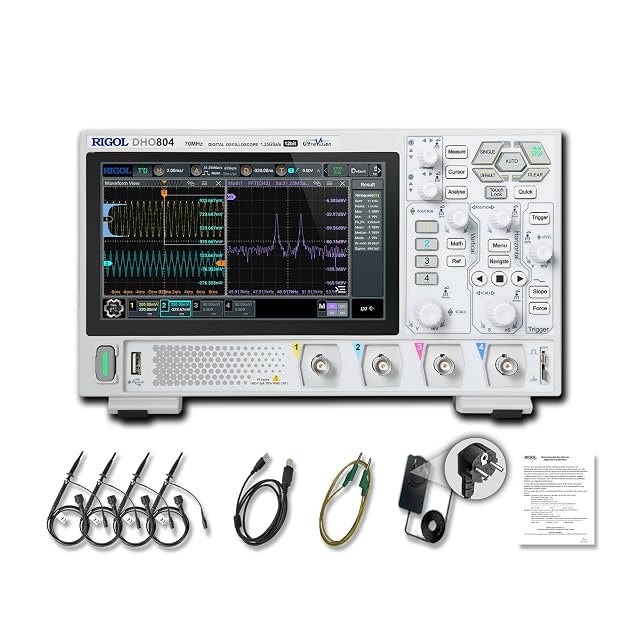
70 MHz, 12-bit, up to 1.25 GSa/s with one channel on (312.5 MSa/s with all four). Hands-on tested by OhmSavvy.

200 MHz on two channels, 1 GSa/s with one channel on, for faster edges.
As an Amazon Associate I earn from qualifying purchases. Prices and availability are shown on Amazon.
Frequently asked questions
Why does my square wave look like a sine wave on my oscilloscope?
The scope or probe is not passing enough of the square wave's harmonics. A square wave is built from its fundamental plus odd harmonics at three, five and seven times the frequency. If those sit above the scope's bandwidth, a 20 MHz bandwidth limit or a 1x probe's few-megahertz bandwidth, only the fundamental survives and the trace rounds into a sine-like shape. Turn the limit off, use 10x, or use a faster scope.
Why are the corners of my square wave rounded or spiky?
Almost always probe compensation. A 10x probe has a small trimmer capacitor that must be matched to the scope input it is plugged into. Under-compensated, corners are rounded and the top slopes up slowly; over-compensated, each edge has a spike that decays back to the flat top. Clip the probe to the calibration output and turn the trimmer until the top is flat and the corners are square.
Can the oscilloscope itself distort a signal?
Yes, in several ways. Limited bandwidth rounds fast edges, a low sample rate makes jagged or completely false shapes, an overdriven input clips the peaks, and filters, averaging or high-resolution modes smooth detail away. The probe adds its own effects through compensation, loading and its ground lead. Any distortion that changes when you change a setting or the probe is coming from the measurement, not the circuit.
What is aliasing on an oscilloscope?
Aliasing happens when the scope samples a signal too slowly, fewer than two samples per cycle, so the dots it joins up describe a different, slower waveform that is not really there. It is most common at slow timebase settings, where the sample rate drops to fit the record into memory. If the trace changes shape or frequency when you change time/div, suspect aliasing and speed the timebase up.
Why does my waveform look different with a 1x probe than with 10x?
A 1x probe connects the scope's full input capacitance plus the cable's capacitance straight to your circuit, often somewhere around 50 to 100 pF or more, and many 1x probes are only rated for a few megahertz. That load slows edges on any node with appreciable source resistance. A 10x probe presents roughly 10 MΩ and around 10 to 15 pF, so it disturbs the circuit far less.
How do I know if distortion is in my circuit or my scope?
Change the measurement and watch the distortion. Try the calibration output, a second probe, a short ground spring, 10x, a faster timebase and full bandwidth. If the shape changes with any of these, the measurement is responsible. If it stays identical, compare the stage's input and output on two channels: distortion present at the output but not the input is created by that stage.
Where to go next
Why Does an Oscilloscope Waveform Look Noisy? →
Fuzz and hum on the trace rather than a changed shape.
How to Measure Overshoot and Ringing →
Put numbers on edge ringing once you know it is real.
Why Is My Oscilloscope Frequency Reading Unstable? →
When the shape looks fine but the Freq readout jumps around.
What Is Oscilloscope Bandwidth? →
The -3 dB definition and why edges need headroom.


