HOW-TO GUIDE
Why Is My Oscilloscope Trigger Not Working?
By the OhmSavvy Research Team ·

What a dead trigger looks like
A trigger that is not working at all shows up in a handful of recognizable ways. The status readout, usually in a top corner of the screen, never says Trig'd (some brands abbreviate it to T'D) and instead shows Wait, Ready, Armed, Trig? or Auto. In Normal mode the screen goes blank or freezes on the last good capture. Pressing Single arms the scope and nothing ever happens. Or you have wired a sync signal to the EXT input and the scope behaves as if it isn't there.
This page is about a trigger that never fires. If the trigger does fire but the trace slides, rolls or jitters sideways, that is a stability problem with different fixes, covered in how to stop an oscilloscope waveform from drifting. And if every channel shows a flat line whatever you do, start with why an oscilloscope shows a flat line instead, because a missing signal can't trigger anything.
The trigger is a chain of gates
It helps to picture the trigger as a series of gates the signal must pass, in order. The source selector picks which input feeds the trigger. Trigger coupling filters that copy of the signal. A comparator checks whether it crosses the level. The trigger type then asks whether the crossing matches the pattern you asked for, holdoff decides whether enough time has passed since the last trigger, and the sweep mode decides what to draw while waiting. One closed gate anywhere along the chain means no trigger, however perfect the other five settings are.
Causes, checks and fixes
| Symptom | Likely cause | How to check | Fix |
|---|---|---|---|
| Status stays on Wait or Auto | Level above or below the waveform | Find the T marker against the trace | Press the 50% or set-level function |
| Nothing triggers, trace looks fine | Source is a different channel | Read the source in the trigger readout | Set the source to the probed channel |
| Never triggers on a clean square wave | Pulse, video, runt or pattern type left on | Open the trigger type menu | Select Edge |
| Pulse trigger never fires | Width condition the pulses can't meet | Measure the real pulse width with cursors | Set the condition around the measured width |
| Screen updates once every few seconds | Holdoff far longer than the signal period | Read the holdoff value | Reset holdoff to its minimum |
| Slow signal won't trigger, fast one will | AC or LF-reject trigger coupling | Check the trigger coupling setting | Use DC trigger coupling |
| Level reads sensibly but never crosses | Probe 10x, channel set to 1x | Compare the probe switch with the channel menu | Match the channel probe ratio to the probe |
| Small ripple or noise won't trigger | Signal under the trigger sensitivity | Count how many divisions the signal spans | Reduce volts/div until it fills several divisions |
| EXT sync signal ignored | Source not EXT, or signal outside the EXT range | Check source and the manual's EXT specs | Select EXT; scale or attenuate the sync signal |
| Normal or Single sits armed forever | The qualifying event never happens | Switch to Auto and watch the signal | Change slope or level, or arm before the event |
1Force a capture to split the problem in half
Most scopes have a Force Trigger button, sometimes labeled Force or Force Trig, and it takes a capture on demand. Press it once in Normal mode. A waveform appearing proves the probe, channel and acquisition all work and that the fault lies purely in the trigger settings. If even a forced capture is empty, the problem is upstream of the trigger: the signal isn't reaching the channel, so work through the flat line checks first. Switching the mode to Auto gives the same answer, because Auto draws on a timer when nothing triggers.
2Confirm the trigger source
The trigger watches one input, chosen in the trigger menu and normally printed in the trigger readout beside the level, for example "CH1 ↑ 1.20 V". With the probe in CH3 and the source on CH1, the comparator sees an empty input and has nothing to cross. This is especially easy to miss after Autoset, which may choose a channel for you, or when you move a probe between inputs without touching the trigger menu. On a multichannel capture, the source should be the cleanest, most regular signal of the set; the others will be drawn in their true time relationship to it.
3Put the level inside the signal swing
The level is a voltage the waveform has to pass through. Suppose you last looked at 5 V logic with the level at 2.5 V, then probe a 3.3 V microcontroller pin with the level set to 5 V for some earlier job. The signal swings from 0 V to 3.3 V, so it never reaches 5 V and the comparator never flips. Lowering the level to the midpoint, 3.3 ÷ 2 = 1.65 V, gives it a crossing on every edge. The same trap appears with a DC-offset signal: a 200 mV ripple riding on a 12 V rail spans roughly 11.9 V to 12.1 V, so a level of 11 V or 13 V sees no crossing at all, while 12.0 V sees two per cycle.
Most scopes have a shortcut that sets the level to the middle of the signal, often a 50% button or a press on the level knob. Use it whenever you change signals; it is the quickest single fix for a scope stuck on Wait.
4Match the probe ratio so the level means what you think
The trigger level is expressed in the same scaled volts as the trace, so a probe ratio mismatch moves the real threshold by a factor of ten. With a 10x probe and the channel left on 1x, a 0 to 5 V signal is drawn as 0 to 0.5 V. Type in a level of 2.5 V because that is the midpoint of 5 V logic, and the threshold at the probe tip is really 25 V, which the circuit never reaches. Flip the mismatch the other way and the trigger does fire, but at the very foot of the edge where ringing and noise make it erratic.
| Probe switch | Channel setting | 0–5 V signal drawn as | Level typed in | Real threshold at the tip | Result |
|---|---|---|---|---|---|
| 10x | 10x | 0 to 5 V | 2.5 V | 2.5 V | Triggers mid-edge |
| 10x | 1x | 0 to 0.5 V | 2.5 V | 2.5 × 10 = 25 V | Never triggers |
| 1x | 10x | 0 to 50 V | 2.5 V | 2.5 ÷ 10 = 0.25 V | Triggers low on the edge |
Set the channel's probe menu to match the switch on the probe body. The full routine is in how to connect an oscilloscope probe correctly.
5Go back to an edge trigger and check pulse conditions
Scopes remember the last trigger type, so a pulse width, video, runt, slope or pattern trigger set up for an earlier job keeps waiting for an event your new signal never produces. A video trigger waits for composite sync pulses and ignores a plain clock. A runt trigger fires only on pulses that cross one threshold but not the other, so a healthy square wave never qualifies; that is exactly how it should behave, as triggering on a runt pulse explains. Select Edge in the type menu before anything else.
If you do need a pulse width trigger, the condition must bracket a width that actually occurs. A 1 kHz PWM signal at 25% duty has a period of 1 ms and a high time of 0.25 × 1 ms = 250 µs. A condition of "positive pulse wider than 300 µs" never matches; "wider than 200 µs" matches every cycle. The polarity matters too, since a negative pulse width setting measures the low time, 750 µs here. Measure the real width with cursors first, using an edge trigger, then set the condition around that number.
6Shorten the holdoff
Holdoff is the time after each trigger during which the scope refuses to trigger again. Its job is to stop a burst of pulses from producing several start points, but set too long, it makes the scope look dead. On a 1 kHz signal, a holdoff of 1.5 ms skips every other cycle and the picture is unaffected. A holdoff of 2 s means at most one new capture every 2 seconds, so in Normal mode the screen appears to freeze. Many scopes allow holdoff values of several seconds, which is easy to reach by spinning the multipurpose knob in the wrong menu. Return holdoff to its minimum unless you have a burst signal that needs it.
| Holdoff (1 kHz signal) | Arithmetic | Captures per second, at most |
|---|---|---|
| Minimum (ns range) | Limited by the scope's update rate | Every cycle is a candidate |
| 1.5 ms | Next edge after 1.5 ms is at 2 ms | 500 (every second cycle) |
| 100 ms | 1 ÷ 0.1 s | 10 |
| 2 s | 1 ÷ 2 s | 0.5 (looks frozen) |
7Set the trigger coupling to DC
Trigger coupling is separate from the channel's input coupling and only filters the copy of the signal the comparator sees. AC trigger coupling removes the DC level, so a level you set against the displayed DC trace no longer lines up with what the trigger receives. LF reject goes further and removes everything below a corner frequency that is often in the tens of kilohertz; check your manual for the exact figure. Take an illustrative 50 kHz corner and a 20 Hz, 1 V peak-to-peak sine: a first-order filter passes roughly 20 ÷ 50,000 = 0.0004 of it, about 0.4 mV, far too little to cross any useful level. That is why a slow sensor signal or a button press won't trigger while a fast clock on the same scope triggers fine. Use DC trigger coupling as the default, and keep HF reject or noise reject for the drifting and jitter problems they were designed for.
8Make the signal big enough to trigger on
A digital scope's trigger works on the digitized trace, so its sensitivity is specified in divisions rather than volts. Datasheets commonly quote figures of around half a division to one division, often worse near the top of the bandwidth or with noise reject turned on; check your own model. A signal that is a sliver on screen gives the comparator nothing to work with. Take 30 mV of switching ripple: at 500 mV/div it is 0.03 ÷ 0.5 = 0.06 divisions tall, which no trigger will reliably detect, while at 10 mV/div it spans 3 divisions and triggers cleanly.
The chart shows how tall the same 30 mV ripple is at each setting. The highlighted bars clear a typical one-division sensitivity with margin; the others sit at or below it. If the ripple rides on a DC rail, use AC input coupling or offset to bring it on screen at the small volts/div setting, then trigger on it.
9Check the external trigger input
An EXT trigger input lets a sync or gate signal trigger the scope without using up a channel, but it has three common traps. First, the source must be set to EXT; the input is otherwise ignored. Second, its level range is usually narrower than a channel's, often only a few volts either side of zero, and some scopes offer an EXT/5 setting to stretch it. A gate signal that swings between 9 V and 12 V needs a level near 10.5 V, which may simply be out of reach, so divide it down first or use the EXT/5 setting. Third, EXT inputs often need a larger signal than a channel does to trigger, so a 50 mV sync pulse may never register. The external input is also not drawn on screen, which makes it hard to see what it is receiving; feed the same signal to a spare channel to check it. Some four-channel bench scopes have no EXT input at all, so check the panel and the manual for your model.
10Make sure the qualifying event really happens
Normal and Single modes wait for a valid trigger and do nothing in the meantime, which is correct behavior when the event is rare. The scope can only catch it if it actually occurs after you arm. Common misses: pressing Single after the power-up you wanted to capture; a rising slope set to catch a supply that collapses, which is a falling edge; or a level set for a glitch that turns out to be smaller than you expected. Switch to Auto, look at the signal, set the slope and level against what you see, then return to Normal or Single and cause the event again. If you are hunting an intermittent fault, persistence and segmented memory help, as described in using persistence to find intermittent glitches.
When nothing on this list helps, save your setup if you need it, then restore the default setup and probe the calibration output. A scope that triggers on its own square wave from defaults is healthy. The full trigger walkthrough is in how to trigger an oscilloscope, and falling-edge triggering covers events that go low.
Safety: trigger problems are never a reason to probe mains directly
In short
Any of these bench scopes has the Force, 50% level, holdoff and trigger coupling controls used above. A trigger that won't fire is a settings problem, not a reason to upgrade, but if you are choosing a scope, compare them in our best beginner oscilloscopes roundup.
Bench scopes with full trigger menus
Hands-on tested. 100MHz, 4 channels, 1 GSa/s, with a well-regarded UI.

Hands-on tested. 50MHz, 4 channels, 1 GSa/s and a large 7-inch display.
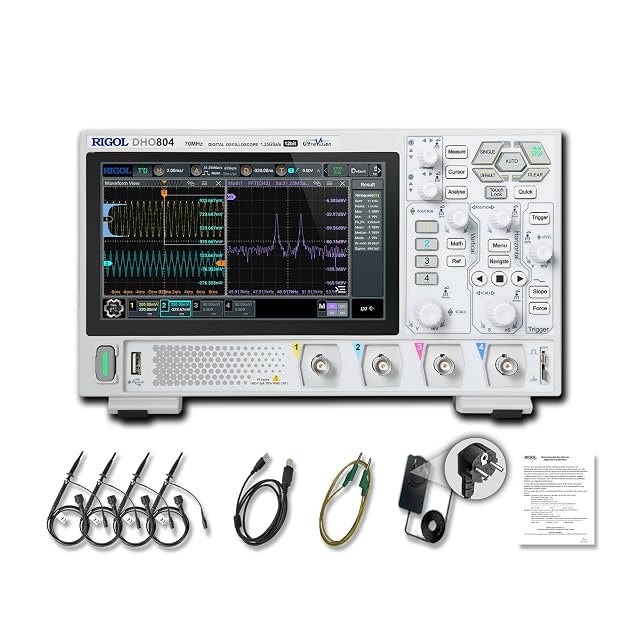
Hands-on tested. 70MHz, 4 channels, 12-bit, with a 7-inch touchscreen.
As an Amazon Associate I earn from qualifying purchases. Prices and availability are shown on Amazon.
Frequently asked questions
Why does my oscilloscope only show a trace in Auto mode?
Auto mode draws a trace on a timer when no trigger arrives, so it hides a trigger that never fires. Normal mode waits for a real trigger and draws nothing until one comes. If the trace vanishes the moment you switch to Normal, the trigger was never working; check the source, put the level at mid-swing and reset the type to Edge, then try Normal again.
What does the Force Trigger button do on an oscilloscope?
Force Trigger makes the scope take one capture immediately, as if a trigger had occurred, whatever the trigger settings say. It is a quick diagnostic: if a waveform appears after pressing it, the probe, channel and acquisition all work and the fault is purely in the trigger conditions. If even a forced capture shows nothing, look at the channel and probe instead of the trigger.
Why won't my scope trigger on a small signal?
Digital scopes need the signal to cross the level by a minimum amount, usually specified as a fraction of a vertical division, so a signal that is tiny on screen gives the comparator too little to work with. A 30 mV ripple at 500 mV/div is only 0.06 divisions tall. Turn the volts/div down until the signal covers a few divisions and the trigger normally locks.
Why is my oscilloscope external trigger input ignored?
The trigger source must be set to EXT, or the scope keeps watching a channel instead. Beyond that, the external input usually has a narrower level range and less sensitivity than the main channels, so a large or offset sync signal may sit outside it and a tiny one may never register. Check the manual's external trigger range, and some four-channel scopes have no EXT input at all.
Is my oscilloscope broken if it will not trigger at all?
Almost never. Restore the default setup, probe the scope's own calibration output and press Auto or Autoset. A healthy scope triggers on that square wave straight away. If it does, the hardware is fine and a setting was blocking the trigger. If it still cannot trigger on its own calibration signal after a default setup, contact the maker or a repair service.
Why does Single mode never capture anything?
Single arms the scope once and waits for one event that meets every trigger condition. If the event happened before you pressed Single, never crosses the level, or moves in the opposite direction to the slope you set, the scope waits indefinitely. Arm it first, then cause the event, and check that a falling event such as a supply dropping out is paired with a falling slope.
Where to go next
How to Trigger an Oscilloscope →
The full setup of source, level, slope, mode and holdoff from scratch.
How to Stop a Waveform from Drifting →
When the trigger fires but the trace still slides or jitters sideways.
Why Is There No Signal on One Oscilloscope Channel? →
When one input shows nothing while another works.
Why Is My Oscilloscope Frequency Reading Unstable? →
A jumping frequency readout often traces back to the trigger.

