Disclosure: OhmSavvy earns a commission from qualifying Amazon purchases made through the links below, at no extra cost to you. How we're funded.
At a glance
Our top picks

Fluke 287
Fluke's electronics logging meter: 50,000 counts, 0.01 µA resolution and graphs on the meter, without the 289's industrial extras.
Check price on Amazon →Why we picked it ↓
Fluke 289
The only handheld here with a 50 Ω range at 1 mΩ resolution, plus 0.01 µA current resolution and on-screen trend logging.
Check price on Amazon →Why we picked it ↓
Fluke 87V
The step-up pick for anyone who needs CAT IV protection and high-resolution readings daily.
Check price on Amazon →Why we picked it ↓Also great
- 4
 EEVblog Brymen BM786Check pricePrice →Best Brymen for Electronics4.6★★★★★
 - 5
 UNI-T UT181ACheck pricePrice →Best Color-Screen Data Logger4.4★★★★☆
 - 6
 UNI-T UT61E+Check pricePrice →Best Budget Meter for Electronics4.5★★★★★
 - 7
 OWON B41T+Check pricePrice →Best Budget Bluetooth Logger4.2★★★★☆
 - 8
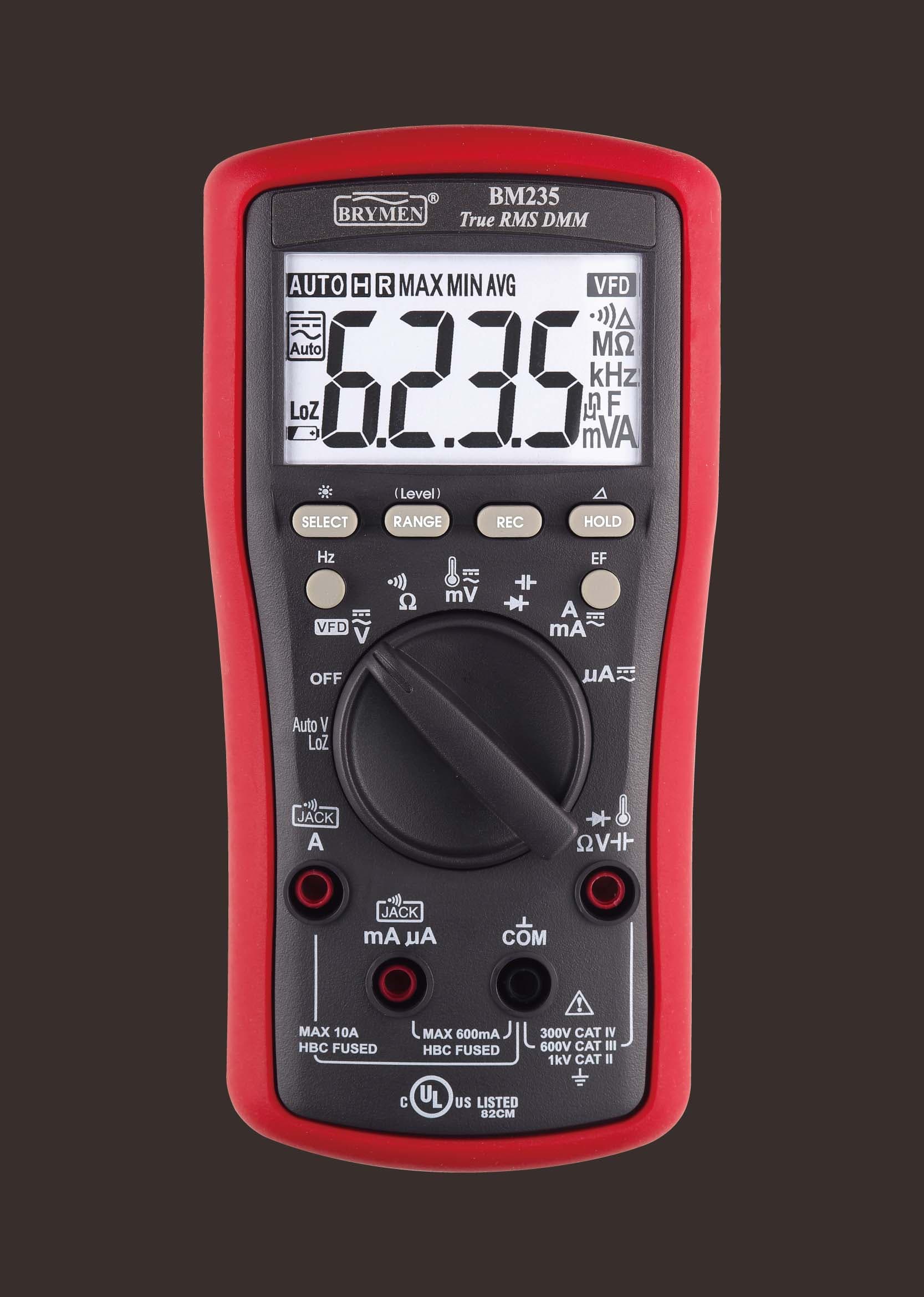 Brymen BM235Check pricePrice →Best Features for the Money4.6★★★★★
 - 9
 OWON OW18ECheck pricePrice →Best Budget µA Meter4.1★★★★☆
 - 10
 KAIWEETS HT118ECheck pricePrice →Cheapest 20,000-Count µA Meter4.2★★★★☆
Quick shopping
Compare at a glance
Swipe sideways on mobile to see every spec.
| Model | Award | Rating | Accuracy | Safety rating | Auto-ranging | |
|---|---|---|---|---|---|---|
 #1Fluke 287 #1Fluke 287 | Best Logging Meter for Electronics | 4.6★★★★★ | True RMS, 0.025% basic DC V | CAT IV 600V / CAT III 1000V | Yes (manual override) | Check price → |
 #2Fluke 289 #2Fluke 289 | Best for Low Resistance | 4.7★★★★★ | True RMS, 0.025% basic DC V | CAT IV 600V / CAT III 1000V | Yes (manual override) | Check price → |
| #3Fluke 87V✓ Tested | Best for Professionals | 4.8★★★★★ | True RMS | CAT III 1000V / CAT IV 600V | Yes | Check price → |
| #4EEVblog Brymen BM786 | Best Brymen for Electronics | 4.6★★★★★ | AC+DC True RMS, 0.03% DC V | CAT III 1000V / CAT IV 600V | Yes (manual override) | Check price → |
| #5UNI-T UT181A | Best Color-Screen Data Logger | 4.4★★★★☆ | True RMS, ±(0.025%+5) DC V | CAT III 1000V / CAT IV 600V | Yes (manual override) | Check price → |
| #6UNI-T UT61E+ | Best Budget Meter for Electronics | 4.5★★★★★ | True RMS, ±(0.05%+5) DC V | CAT III 1000V / CAT IV 600V | Yes (manual override) | Check price → |
| #7OWON B41T+ | Best Budget Bluetooth Logger | 4.2★★★★☆ | True RMS, ±(0.1%+2) DC V | 1000V CAT III (case marking) | Yes | Check price → |
| #8Brymen BM235 | Best Features for the Money | 4.6★★★★★ | True RMS | CAT III 600V / CAT IV 300V | Yes (manual override) | Check price → |
| #9OWON OW18E | Best Budget µA Meter | 4.1★★★★☆ | True RMS, ±(0.1%+2) DC V | 1000V CAT III / 600V CAT IV (case marking) | Yes | Check price → |
| #10KAIWEETS HT118E | Cheapest 20,000-Count µA Meter | 4.2★★★★☆ | ±(0.08%+5) DC V; True RMS not stated | CAT III 1000V / CAT IV 600V | Yes | Check price → |
In depth
Detailed reviews
Fluke 287
Fluke's electronics logging meter: 50,000 counts, 0.01 µA resolution and graphs on the meter, without the 289's industrial extras.
Best for:Electronics design, µA and logging
The 287 shares the 289's 50,000-count display, 500 µA range with 0.01 µA resolution, 100 mF capacitance and TrendCapture logging, and it carries the same CAT IV 600V / CAT III 1000V rating. It drops the 289's 50 Ω low-ohm range, LoZ and low-pass filter, so its finest resistance resolution is 0.01 Ω on the 500 Ω range (with relative mode to zero the leads). For bench electronics, sleep-current checks and logging a drifting supply overnight, it does the job for less than the 289.
Why it fits: It leads this list because it combines 0.01 µA resolution on a 500 µA range with a published 102 µV/µA burden and on-screen TrendCapture logging, so you can leave it on a sleeping board and graph the result. It costs far more than a hobby meter, and Amazon stock comes from a third-party seller.
- Accuracy
- True RMS, 0.025% basic DC V
- Safety rating
- CAT IV 600V / CAT III 1000V
- Auto-ranging
- Yes (manual override)
- Best for
- Electronics design, µA and logging
Reasons to buy
- +0.01 µA resolution on the 500 µA range
- +On-screen trend logging with real-time clock
- +Limited lifetime warranty
Reasons to avoid
- −No 50 Ω low-ohm range (that's the 289)
- −Third-party seller and an Amazon listing with wrong CAT wording
Fluke 289
The only handheld here with a 50 Ω range at 1 mΩ resolution, plus 0.01 µA current resolution and on-screen trend logging.
Best for:Low-ohm, µA and logged electronics work
The Fluke 289 is a 50,000-count True RMS logging meter rated CAT IV 600V / CAT III 1000V. Its two-terminal 50 Ω range resolves 1 mΩ using a 10 mA test current, and relative mode removes test-lead resistance, so you can check shunts, contacts and PCB traces without a separate milliohm meter. The 500 µA range resolves 0.01 µA with a published burden of about 102 µV per µA. TrendCapture graphs logged readings on the meter itself, and LoZ and a low-pass filter cover electrical work too. The catch is the price, roughly three times a good hobby meter.
Why it fits: Its microamp performance matches the 287: the same 500 µA range, 0.01 µA steps and 102 µV/µA burden, with logging too. It ranks second only because its extra 50 Ω low-ohm range, LoZ and low-pass filter add cost that pure current work doesn't need.
- Accuracy
- True RMS, 0.025% basic DC V
- Safety rating
- CAT IV 600V / CAT III 1000V
- Auto-ranging
- Yes (manual override)
- Best for
- Low-ohm, µA and logged electronics work
Reasons to buy
- +50 Ω range with 1 mΩ resolution and REL lead zeroing
- +500 µA range with 0.01 µA resolution and published burden voltage
- +Logs and graphs readings on screen (TrendCapture)
Reasons to avoid
- −Expensive, and sold here by a third-party seller
- −Two-terminal low-ohm range, not true 4-wire Kelvin
Fluke 87V
The step-up pick for anyone who needs CAT IV protection and high-resolution readings daily.
Best for:Industrial technicians, daily professional use
The 87V is Fluke's industrial-grade step up from the 117 — a 1000V CAT III / 600V CAT IV rating, a 6,000-count main display with a 19,999-count high-resolution mode, and a 32-segment analog bar graph for watching signals change in real time.
Why it fits: The 87V has a 600.0 µA range at 0.1 µA, Fluke's HiRes mode reaches 0.01 µA, and its burden of 100 µV/µA ties the Brymen BM235 for the lowest figure published here. It carries our Hands-on Tested badge. It sits below the 28x pair because it can't log readings on its own.
- Accuracy
- True RMS
- Safety rating
- CAT III 1000V / CAT IV 600V
- Auto-ranging
- Yes
- Best for
- Industrial technicians, daily professional use
Reasons to buy
- +Joint-highest CAT rating in this list (CAT IV 600V / CAT III 1000V)
- +19,999-count high-resolution mode
- +Analog bar graph tracks fast-changing signals
Reasons to avoid
- −Among the most expensive picks here
- −Overkill for casual home use
EEVblog Brymen BM786
A 60,000-count Brymen with 0.01 µA and 0.01 Ω resolution and CAT IV 600V, for about a third of a Fluke 287.
Best for:Bench electronics and PCB repair
The BM786 is a Brymen meter made for the EEVblog: AC+DC True RMS, 60,000 counts, CAT III 1000V / CAT IV 600V, and 0.03% best DC voltage accuracy. Its 600.00 µA range resolves 0.01 µA at ±(0.075%+20 digits), and its 600.00 Ω range resolves 0.01 Ω. Brymen publishes a burden of 0.2 mV per µA, twice the BM235's, so in very low-voltage circuits it drops more voltage than you may expect. The BeepLit continuity responds in under 100 µs. It has no logging or PC link, but for hands-on bench work and PCB repair it's a strong all-rounder.
Why it fits: Sixty thousand counts and a 600.00 µA range at 0.01 µA give it the finest bench display among the non-logging meters here, for much less than a Fluke 287. Its 0.2 mV/µA burden is twice that of the Fluke 87V and BM235, and it has no logging or PC link.
- Accuracy
- AC+DC True RMS, 0.03% DC V
- Safety rating
- CAT III 1000V / CAT IV 600V
- Auto-ranging
- Yes (manual override)
- Best for
- Bench electronics and PCB repair
Reasons to buy
- +0.01 µA and 0.01 Ω resolution at 60,000 counts
- +Fast latching BeepLit continuity (<100 µs)
- +Relative zero, Max/Min/Avg and crest capture
Reasons to avoid
- −0.2 mV/µA burden is higher than the BM235's
- −No data logging or PC connection
UNI-T UT181A
A 60,000-count colour-screen logging meter that stores 20,000 readings and graphs them, for well under Fluke 287 money.
Best for:Logging battery drain and drift
The UT181A is a True RMS logging meter with a 3.5-inch colour TFT, 60,000 counts and CAT III 1000V / CAT IV 600V. Its lowest ranges are 600 µA and 600 Ω, so at 60,000 counts it reads to 0.01 µA and 0.01 Ω, though UNI-T doesn't print a per-range resolution. It logs 20,000 readings with a real-time clock and trend graph, measures two thermocouples at once, and runs on a rechargeable Li-ion pack. It has IP65 sealing and a 1 kHz low-pass filter. Bluetooth needs UNI-T's optional adaptor, despite what the listing implies.
Why it fits: A 600 µA range at 60,000 counts implies 0.01 µA steps, and its 20,000-reading logger with trend graph suits watching a battery device's drain change over a night. UNI-T doesn't publish per-range resolution or burden voltage, which keeps it behind the meters above.
- Accuracy
- True RMS, ±(0.025%+5) DC V
- Safety rating
- CAT III 1000V / CAT IV 600V
- Auto-ranging
- Yes (manual override)
- Best for
- Logging battery drain and drift
Reasons to buy
- +20,000-reading logger with trend graph on a colour screen
- +60,000 counts, 600 µA and 600 Ω lowest ranges
- +Rechargeable battery and IP65 sealing
Reasons to avoid
- −Bluetooth needs an optional adaptor
- −UNI-T doesn't publish per-range resolution or burden voltage
UNI-T UT61E+
A budget 22,000-count True RMS meter with 0.01 µA and 0.01 Ω resolution, REL mode and a USB link.
Best for:Arduino, hobby electronics, PCB repair
The UT61E+ is UNI-T's 22,000-count version of the UT61+ series: True RMS, CAT III 1000V / CAT IV 600V, with a 220.00 µA range at 0.01 µA resolution and a 220.00 Ω range at 0.01 Ω (±0.5% + 10 digits). REL mode subtracts lead resistance, which UNI-T's manual tells you to do for low-ohm readings. It also adds capacitance to 220 mF, frequency to 220 MHz, hFE, NCV and a USB cable for PC readout. It has no temperature function (that's the UT61D+), and UNI-T doesn't publish its burden voltage.
Why it fits: Its 220.00 µA range resolves 0.01 µA at ±(0.5% + 10 digits), and the included USB cable sends readings to a PC, at a much lower price than the Fluke and Brymen meters above it. UNI-T doesn't publish the burden voltage, so you can't correct for the meter's own drop.
- Accuracy
- True RMS, ±(0.05%+5) DC V
- Safety rating
- CAT III 1000V / CAT IV 600V
- Auto-ranging
- Yes (manual override)
- Best for
- Arduino, hobby electronics, PCB repair
Reasons to buy
- +0.01 µA and 0.01 Ω resolution at a budget price
- +REL mode to zero test-lead resistance
- +USB PC link, capacitance to 220 mF, frequency to 220 MHz
Reasons to avoid
- −No temperature measurement
- −Burden voltage not published
OWON B41T+
A 22,000-count Bluetooth meter with 0.01 µA and 0.01 Ω resolution that logs 10,000 points by itself.
Best for:Logging µA sleep current on a budget
The B41T+ is OWON's 4½-digit (22,000-count) True RMS meter. Its 220 µA range resolves 0.01 µA and its 220 Ω range resolves 0.01 Ω, both at ±(0.5% + 10 digits), and relative mode zeroes the leads. Bluetooth 4.0 sends readings to a phone app, and the "+" model records up to 10,000 points over as long as 168 hours with no phone attached, so it can log a project's sleep current overnight. OWON doesn't state a CAT rating on its page (the case says 1000V CAT III), AC voltage tops out at 750 V and burden voltage isn't published.
Why it fits: The 220 µA range reads to 0.01 µA, and the meter records up to 10,000 points over as long as 168 hours with no phone attached, which is ideal for overnight sleep-current runs. OWON states no burden voltage or CAT rating on its page.
- Accuracy
- True RMS, ±(0.1%+2) DC V
- Safety rating
- 1000V CAT III (case marking)
- Auto-ranging
- Yes
- Best for
- Logging µA sleep current on a budget
Reasons to buy
- +0.01 µA and 0.01 Ω resolution
- +Offline logging of 10,000 points without a phone
- +Bluetooth app, capacitance to 220 mF, temperature
Reasons to avoid
- −OWON publishes no CAT rating or burden voltage
- −AC voltage limited to 750 V
Brymen BM235
True RMS with AutoV LoZ, NCV, VFD mode and temperature: more electrician features than most meters at its price.
Best for:Electricians and enthusiasts who want every feature
Brymen's BM235 packs features usually found on pricier meters: True RMS, a 6,000-count backlit display, AutoV low-impedance voltage, non-contact voltage detection, a VFD mode for variable-speed drives, Type-K temperature, Max/Min/Avg and relative zero, with 1000V-rated HBC fuses. Brymen's catalog and the meter's own markings give CAT III 600V and CAT IV 300V. The US listing is the EEVblog edition, and support runs through Brymen's distributors rather than a big US brand.
Why it fits: It resolves only 0.1 µA on its 600.0 µA range, but Brymen publishes a low 0.1 mV/µA burden and the meter adds electrician features like AutoV LoZ and NCV. Choose it if µA checks are occasional and mains work is the main job.
- Accuracy
- True RMS
- Safety rating
- CAT III 600V / CAT IV 300V
- Auto-ranging
- Yes (manual override)
- Best for
- Electricians and enthusiasts who want every feature
Reasons to buy
- +AutoV LoZ and NCV built in
- +VFD voltage and frequency mode
- +Max/Min/Avg, relative zero and Type-K temperature
Reasons to avoid
- −CAT IV only to 300V, below the Fluke 179 and Klein MM700
- −Less familiar brand in the US; Amazon listing is the EEVblog edition
OWON OW18E
A budget True RMS meter with a 200.00 µA range, 0.01 Ω resolution, Bluetooth and offline logging.
Best for:Arduino and hobby electronics on a budget
The OW18E is a 19,999-count (sold as 20,000) True RMS meter. Its 200.00 µA range resolves 0.01 µA at ±(0.5% + 10 digits) DC and its 200.00 Ω range resolves 0.01 Ω. It adds NCV, a flashlight, Type-K temperature, capacitance to 20 mF and a 20 A range, plus BLE 4.0 and offline recording on the E model. The case is marked 1000V CAT III / 600V CAT IV, but OWON's page doesn't state a rating and doesn't publish burden voltage. Amazon showed only one in stock when we checked.
Why it fits: A 200.00 µA range with 0.01 µA resolution, Bluetooth and offline recording make it the cheapest route to fine microamp readings here. Burden voltage isn't published.
- Accuracy
- True RMS, ±(0.1%+2) DC V
- Safety rating
- 1000V CAT III / 600V CAT IV (case marking)
- Auto-ranging
- Yes
- Best for
- Arduino and hobby electronics on a budget
Reasons to buy
- +0.01 µA and 0.01 Ω resolution at a budget price
- +Bluetooth with offline recording
- +NCV, flashlight and temperature included
Reasons to avoid
- −Low stock on Amazon at last check
- −OWON publishes no burden voltage or CAT rating
KAIWEETS HT118E
A budget 20,000-count meter with a 200 µA range (KAIWEETS doesn't claim True RMS) and no relative mode for low-ohm work.
Best for:Beginner Arduino and µA checks
The HT118E has a 20,000-count display, CAT III 1000V / CAT IV 600V and a 200 µA range at ±(0.5% + 5 digits) DC. At 20,000 counts that implies 0.01 µA resolution, though KAIWEETS doesn't print it. It covers temperature, capacitance, frequency, NCV and continuity, with lit input jacks and a flashlight. Its 200 Ω range is only ±(1.0% + 15 digits) and KAIWEETS lists no relative mode, so you have to subtract lead resistance yourself. That makes it better for sleep-current checks than for milliohm work.
Why it fits: Its 200 µA range on a 20,000-count display implies 0.01 µA steps, and DC µA accuracy is ±(0.5% + 5 digits). It ranks last because KAIWEETS doesn't print the resolution or burden voltage and the meter can't log, so it suits quick checks rather than careful characterization.
- Accuracy
- ±(0.08%+5) DC V; True RMS not stated
- Safety rating
- CAT III 1000V / CAT IV 600V
- Auto-ranging
- Yes
- Best for
- Beginner Arduino and µA checks
Reasons to buy
- +200 µA range with 20,000 counts at a budget price
- +CAT III 1000V / CAT IV 600V
- +Lit input jacks, NCV and flashlight
Reasons to avoid
- −No relative mode listed for zeroing test leads
- −Per-range resolution and burden voltage not published
Before you buy
Buying advice
Read the current table, not the dial
Model families share dials and marketing photos, so a µA symbol on a picture doesn't prove a given meter has the range. Fluke's 117 and 179, for example, have no microamp range at all. Look in the maker's specification table for the lowest current range and its resolution, and check the burden voltage line while you're there.
Plan for the wake-up spike
A sleeping device can draw a few microamps and then pull tens or hundreds of milliamps when it wakes to transmit. On a µA range that surge can blow the meter's fuse or drop enough voltage across the shunt to reset the device. Bridge the meter with a switch during start-up and radio bursts, or use a higher range first and step down once the device is quiet.
Decide whether you need a record
If you only confirm that a product sleeps below a target, any meter here will do. If you're tuning firmware or chasing a battery that dies after a week, a recording meter such as the Fluke 287, UNI-T UT181A or OWON B41T+ shows the pattern over time. That trade decides more of the ranking than raw resolution does.
Keep mains work in mind
Several meters here, including the Fluke 87V and Brymen BM235, are also built for electrical panels, while the OWON models don't state a CAT rating on the maker's page. If the same meter will go into a distribution board, weigh the safety rating as heavily as the microamp spec.
Methodology
How we chose
We ranked these ten for microamp work: the smallest current range and its resolution first, then the burden voltage the maker publishes, then logging and PC links for long sleep-current runs. Figures come from maker spec tables, manuals and official listings; this is desk research, and only the Fluke 87V carries our Hands-on Tested badge.
Picks marked "Hands-on Tested" have been bought and tested by us; the rest are desk research. A pick only carries that badge once we have actually bought and tested that unit. More on how we research.
Questions
Frequently asked questions
Can any multimeter measure microamps?+
No. Many electrician's meters, such as the Fluke 117, start their current measurement at amps, and others begin at tens of milliamps. To read microamps you need a meter with a dedicated µA range, usually a few hundred microamps full scale. Check the spec table for a range labeled in µA, not just a µA symbol on the dial of a sibling model.
What is burden voltage and why does it matter for microamps?+
Burden voltage is the drop across the meter's internal shunt while current flows through it. It is specified per microamp, so a meter rated at 100 µV/µA drops 10 mV at 100 µA. That rarely matters at sleep current, but when the circuit wakes and draws much more, a large drop can starve a low-voltage device or trigger a brown-out reset during the test.
How do I measure the sleep current of an Arduino or ESP32 board?+
Break the supply line and put the meter in series, with the red lead in the µA/mA jack. Start on a milliamp range so the boot current doesn't blow the fuse, then switch to the µA range once the board is asleep. Many people bridge the meter with a switch or jumper during wake-up and open it only for the sleep reading.
Is 0.1 µA resolution enough for low-power electronics?+
For confirming that a board sleeps at tens of microamps, yes. For comparing firmware changes that move standby current by fractions of a microamp, 0.01 µA resolution is easier to read. Remember that the accuracy spec adds a fixed number of digits, so the last digit on any meter is less certain than the display suggests.
Why does my multimeter read zero on the microamp range?+
Usually the meter isn't actually in series, the red lead is still in the voltage jack, or the µA/mA fuse has blown, which often happens after measuring a wake-up surge on a low range. Check the fuse with the meter's continuity mode, confirm the lead positions, and make sure the circuit's current really flows through the meter and not around it.
Do I need a logging multimeter to measure standby current?+
Not for a spot check, but standby current often changes as radios wake, timers fire or batteries settle. A meter that records readings, such as the Fluke 287, UNI-T UT181A or OWON B41T+, shows those changes over hours. Without logging, you only see whatever happens while you're watching the display.


