HOW-TO GUIDE
Why Does My Soldering Iron Work on Small Wires but Fail on Thick Wires?
By the OhmSavvy Research Team ·

Thick wire is a bigger heat load than it looks
Wire gauge numbers hide how fast copper adds up. Going from 24 AWG to 12 AWG roughly quadruples the diameter, from about 0.51 mm to about 2.05 mm. Cross-sectional area goes with the diameter squared, so the copper area rises about sixteenfold, from about 0.205 mm² to about 3.31 mm². Each length of wire near the joint therefore has about sixteen times the mass to heat, and the iron has to deliver about sixteen times the energy before the copper reaches the solder's melting point. To your eye the thick wire may look only “a few times bigger”; to the iron it is a much larger job.
The arithmetic is simple enough to check. Take a 10 mm length of solid copper at the joint. Its volume is the area times the length, its mass is volume times copper's density (about 8.96 g/cm³, or 0.00896 g/mm³), and the heat to raise it by ΔT is Q = m × c × ΔT, with copper's specific heat c ≈ 0.385 J/g·K. Using ΔT ≈ 200 K, roughly room temperature to soldering temperature:
- 24 AWG: 0.205 mm² × 10 mm = 2.05 mm³; × 0.00896 = 0.018 g; × 0.385 × 200 ≈ 1.4 J.
- 12 AWG: 3.31 mm² × 10 mm = 33.1 mm³; × 0.00896 = 0.297 g; × 0.385 × 200 ≈ 22.8 J.
These figures are idealized. They ignore the terminal or the second wire you are joining to, the solder itself and every loss to the air, and stranded wire contains slightly less copper than its nominal area. But the ratio holds, and the table and chart below extend it across common sizes using standard AWG areas.
| Gauge | Diameter (approx.) | Area (approx.) | Copper per 10 mm | Heat to +200 K |
|---|---|---|---|---|
| 24 AWG | 0.51 mm | 0.205 mm² | 0.018 g | 1.4 J |
| 20 AWG | 0.81 mm | 0.519 mm² | 0.047 g | 3.6 J |
| 16 AWG | 1.29 mm | 1.31 mm² | 0.117 g | 9.0 J |
| 12 AWG | 2.05 mm | 3.31 mm² | 0.297 g | 22.8 J |
| 10 AWG | 2.59 mm | 5.26 mm² | 0.471 g | 36.3 J |
| 8 AWG | 3.26 mm | 8.37 mm² | 0.750 g | 57.7 J |
Twenty-odd joules sounds small next to a 60W iron, which can put out 60 J every second. The catch is that the wire doesn't just need heating once; it keeps draining heat while you work. Copper is an excellent conductor of heat as well as electricity, and the wire behind the joint carries heat away continuously. Heat flow along a conductor is proportional to its cross-sectional area, so the same sixteenfold jump applies. As a rough illustration, with copper's thermal conductivity at about 400 W/m·K and an assumed 200 K drop over the first 20 mm of wire, steady conduction is about 400 × area × (200 / 0.02). That works out near 0.8 W for 24 AWG but near 13.2 W for 12 AWG, a steady drain on the tip before any heat goes into the joint. The wire is a heat sink, and a thick one is a big heat sink.
Where that heat has to come from matters too. The tip itself only stores a small amount, and when it touches a cold, heavy wire it gives that up within a moment. From then on the joint gets only what the heater can push through the tip, and on a small tip that is a narrow path. That is why the same iron feels strong on fine hookup wire and weak on battery cable: on small wire the tip's stored heat finishes the job before it runs out, and on thick wire it doesn't.
01
Tip touches thick wire
stored tip heat dumps in
02
Tip temperature drops
copper still below melt
03
Wire wicks heat away
drain grows with gauge
04
Solder balls or sets dull
cold or slow joint
Causes, checks and fixes
| Symptom | Likely cause | How to check | Fix or who to call |
|---|---|---|---|
| Solder melts on the tip, balls on the wire | Copper below melting point | Solder won't spread when fed onto the wire | Bigger tip, heat bridge, feed solder to the wire |
| Fine on 22 AWG, hopeless on 12 AWG | Tip too small for the copper area | Fine conical or small bevel tip in use | Widest chisel that fits; larger tip series |
| Starts well, then stalls | Iron can't recover fast enough | Display drops and stays low under load | Higher-power, closed-loop iron |
| Uncontrolled iron goes cold on big joints | Basic iron with no feedback | No temperature setting or readout | Temperature-controlled station or iron |
| Joint dull, grainy, cracks when flexed | Cold joint: wire never fully hot | Visual check; tug test on the wire | Reflow with flux and enough heat |
| Insulation shrinks back or melts | Long contact, heat traveling along the wire | Count seconds; look at the jacket edge | Faster joint, heat sink clip, silicone wire |
| Solder won't wet old or dark wire | Oxidized copper | Wire looks brown or black | Strip fresh, clean, flux, pre-tin |
| Large lug or 8 AWG and up never flows | Job beyond a hand iron | Long heating with no wetting | Crimp the lug or use a high-wattage iron |
Copper area goes with diameter squared
1Use the biggest tip that fits
The tip is the bottleneck between the heater and the wire. A fine conical tip touches a thick wire at a single point and carries heat down a narrow shank, so even a strong heater can't get much through it. A wide chisel or a large bevel tip touches along a line, carries more heat, and stores more heat in its own mass for the first second of contact. For heavy wire, choose the widest tip that still fits the terminal, and lay its flat face along the wire and the terminal together rather than touching with the corner.
A freshly tinned tip with a small blob of molten solder on it transfers heat far better than a dry one: the solder fills the gap between the flat tip and the round wire and acts as a heat bridge. If your iron only came with fine tips, a larger tip from the same series is often the cheapest fix. Our guide to soldering iron tip types covers the shapes, and soldering iron tip care covers keeping a tip tinned so it transfers heat properly.
2Check the iron has the power and recovery
Once the tip's stored heat is gone, the heater has to keep up with the wire. Two things decide whether it can: how much power the heater can deliver, and whether the iron knows it needs to. A closed-loop station has a sensor near the tip and pushes more power in as soon as the temperature falls, so it recovers between and during joints. A basic plug-in iron with no temperature control runs at a fixed power and simply cools under load, then takes a long time to climb back. The same nominal wattage can feel very different between the two.
For thick wire, a temperature-controlled iron in the 60W-plus range with a large tip is a sensible baseline, and USB-C irons need a supply that can actually deliver their rated power, since a weak charger caps them well below it. If the display drops sharply and stays low on every joint, see why a soldering iron temperature keeps dropping for the recovery side in detail; if the solder won't melt even on the tip, the problem is different, and soldering iron not melting solder is the place to start.
3Raise the setpoint a sensible amount
A higher setpoint increases the temperature difference that drives heat into the wire, so it does help. A common approach is to go somewhere around 30 to 50°C above your usual electronics setting for heavy wire, which often lands in the region of 370 to 420°C, but treat that as a starting point, not a rule. Lead-free solder needs more than leaded. Going much higher burns off flux before the joint wets and oxidizes the tip quickly, which makes heat transfer worse, not better. If the joint still takes more than several seconds after a moderate increase, the answer is a bigger tip or a bigger iron, not the top of the dial. For alloy starting points, see soldering iron temperature by metal.
4Clean, flux and pre-tin both parts
Preparation moves most of the work to a moment when you can take your time. Strip the wire cleanly, and if the copper is dull or darkened, strip back to fresh metal. Twist stranded wire tight, brush on flux, then tin it on its own: hold the tip under the wire, feed solder onto the top of the wire, and let it soak in until the strands are bright and filled. Tin the terminal or the other wire the same way. Now the final joint only needs both tinned surfaces brought up to temperature together, and the solder already on them flows almost at once.
Use solder thick enough to feed a useful amount quickly. Fine 0.5 mm wire meant for small pads makes you hold the iron on a heavy joint much longer while you feed it in; something in the region of 0.8 to 1.0 mm or larger is easier on thick wire. The solder wire diameter guide goes through the sizes. For joining two wires end to end, see how to solder wires together.
5Support the joint and preheat the terminal
Thick wire is stiff, and if it springs or shifts while the solder sets, the joint fractures inside even when it looks fine. Clamp the wire and terminal in helping hands, a vise with soft jaws or a weighted holder so both hands are free and nothing moves for a few seconds after you lift the iron. With heavy terminals, heat the terminal first, since it usually has more metal than the wire, then bring the wire in once the terminal is wetted. On a large terminal block or a ground lug bolted to a chassis, the metal it is attached to is another heat sink; disconnect it if you can. Joints on PCB copper are a related case covered in soldering copper wire to a ground pad, and battery terminals in soldering wires to battery terminals.
6Protect the insulation
The heat that thick copper carries away from the joint goes straight toward the insulation. PVC on ordinary hookup wire is typically rated for something like 80 to 105°C in service and softens not far above that, so every extra second on a heavy joint shows up as a jacket that shrinks back or melts. Strip a little more than usual, clip a heat sink or a pair of forceps on the bare copper between the joint and the jacket, and aim to finish quickly rather than gently. Silicone-insulated wire tolerates much more heat and is worth considering for heavy leads you solder often. The guide to soldering wires without overheating insulation covers this in depth.
7Inspect the joint
A good thick-wire joint shows solder that has flowed into the strands and onto the terminal with a smooth, concave fillet, and the outline of the strands is still visible under it. A cold joint, the classic result of an iron that was too small, looks dull, lumpy or crystalline, sits on top of the wire like a bead, or has a visible line where the solder never wetted. Give the wire a firm tug once it has cooled. If it moves or the solder cracks, reflow it with fresh flux and enough heat rather than adding more solder on top; the steps in how to fix a cold solder joint apply to wire joints too. A poor high-current joint can run hot in use, so don't leave a doubtful one in a power lead.
8Know when to use a different tool
There is a size where a hand soldering iron stops being the right tool. The figures above show 8 AWG needing roughly forty times the heat of 24 AWG per length, and heavy battery cables, welding leads and large ring lugs go well past that. A typical bench station struggles there no matter how it is set. For those jobs, the usual options are a high-wattage iron made for heavy work, or crimping the lug with a crimper and die sized for the cable, which is common practice in automotive and marine wiring. Solder also wicks up stranded wire and leaves a stiff section that can fatigue where it flexes, which is one reason many heavy cable lugs are crimped rather than soldered.
If you decide to solder anyway, use an iron rated for the work, prepare everything first, and keep the joint well supported. If the cable carries high current from a battery, solar system or vehicle, follow the equipment maker's termination instructions, and have an electrician or installer do anything connected to your home's wiring.
Heat and electrical safety
Irons for heavy wire
For thick wire you want temperature control, enough power to recover under load, and access to large tips. These come from our verified soldering iron list, and each note uses only the maker's or the official listing's specifications. The FX-601, with 67W and a 540°C ceiling, is our pick for heavy wire and terminals; the FX-888DX is a general bench station that takes larger T18 tips; the HS-02A is a portable option with a high power ceiling, provided your USB-C supply can deliver it. Skip the FX-601 if most of your work is fine electronics, since its lowest setting is 240°C.
Irons with power for thick wire
67W, closed-loop dial 240–540°C on the handle, T19 tips; best for heavy wire, terminals, stained glass.

100W station with a 65W iron, closed-loop 50–480°C, ESD safe, T18 tips.
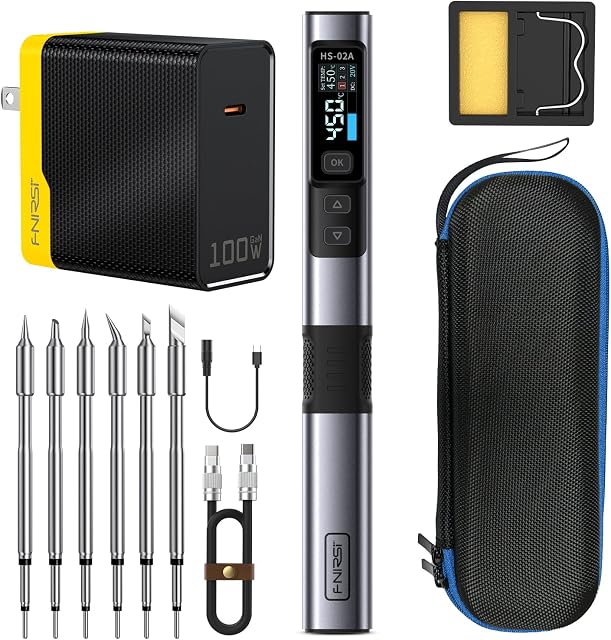
Up to 100W from USB-C PD/QC 9–20V, 100–450°C; a 100W charger and six tips come in the kit.
As an Amazon Associate I earn from qualifying purchases. Prices and availability are shown on Amazon.
Frequently asked questions
What wattage soldering iron do I need for 10 or 12 gauge wire?
Wattage alone doesn't decide it, but a temperature-controlled iron of roughly 60W or more with a large chisel tip handles 12 AWG comfortably for most people, and 10 AWG with good preparation. Cheap uncontrolled irons with the same rating often cope worse because their tips cool and recover slowly. For 8 AWG and heavier cable, a higher-power iron or a crimped lug is usually the better route.
Why does solder ball up on thick wire instead of flowing?
Solder only wets copper that is itself above the solder's melting point. On thick wire the tip melts the solder you feed onto it, but the copper underneath is still too cool, so the molten solder pulls into a ball and sits on the surface. Heat the wire first with a tinned tip and a little solder as a heat bridge, add flux, and feed solder onto the wire, not the tip.
Is it OK to just turn my soldering iron up to the maximum for thick wire?
Turning it up helps a little, but running at the maximum burns flux off before the joint wets, oxidizes the tip quickly and shortens its life. A bigger tip usually does more than another 50°C. Raise the setting moderately, use the largest tip that fits the joint, and if the joint still takes more than several seconds, the iron is too small for the job.
Can I use a butane torch or heat gun to solder thick wire?
Some people do, especially on battery cable lugs, but a flame or hot air heats a wide area, so it is easy to melt insulation, scorch nearby parts or overheat the lug. Never use an open flame near batteries, fuel or flammable material. For large cable lugs, a proper crimping tool with the right die is often the safer and more repeatable choice.
Why does my soldering iron work on stranded wire but not solid wire of the same gauge?
The copper area is about the same, so the heat needed is similar, but solid wire touches the tip along a single curved surface and conducts heat away as one continuous path. Stranded wire, once fluxed and tinned, takes solder between the strands and lets the solder act as a bridge. Flatten the contact with a chisel tip and pre-tin solid wire before joining it.
How long should it take to solder a thick wire?
With the right tip, a capable iron and good preparation, a 12 to 16 AWG joint usually flows within a few seconds of the tip landing. If you are counting past roughly ten seconds, the insulation is probably shrinking back and the joint may end up cold. Lift the iron, let everything cool, then fix the tip, flux or power before trying again.
Where to go next
Why Does My Soldering Iron Temperature Keep Dropping? →
How tip temperature sags and recovers under load, on any kind of joint.
How to Solder Wires Without Overheating Insulation →
Keep PVC and silicone jackets intact while the copper gets hot.
Solder Wire Diameter Guide →
Which solder thickness to feed for fine pads and heavy wire.




