REVIEW · SOLDERING IRONS
Pinecil V2 Review
USB-C powered and pocket-sized — the rare budget tool that doesn't feel like a compromise.
By the OhmSavvy Research Team ·
| Model | Pinecil V2 |
|---|---|
| Power | Up to 88W at 24V DC; about 60W from 20V USB-C PD |
| Heat-up time | ~12 seconds (with a 20V+ supply) |
| Temperature control | OLED digital display |
| Best for | Makers who need a portable iron for field repairs |
| Review status | Desk research, not bench-tested |
Disclosure: OhmSavvy earns a commission from qualifying Amazon purchases made through these links, at no extra cost to you. How we're funded.
The verdict
USB-C powered, pocket-sized, and genuinely fast to heat up — the Pinecil V2 is the rare budget tool that doesn't feel like a compromise, making it a favorite for on-the-go repairs.
Consider it if
- ✓You solder away from a bench: at a desk, on site, or while traveling
- ✓You already own a USB-C PD charger or power bank that can supply 20V at 3A
- ✓You want fast heat-up in a small tool
- ✓You're fine budgeting separately for a stand and a few extra tips to get the portability you want
Skip it if
- ✕You want a stand and a wide tip range out of the box
- ✕You solder for hours at a dedicated bench — a station like the Hakko FX-888DX suits that better
- ✕Your only charger is a low-wattage phone charger: at 12V or 5V the iron is far slower
The trade-off: The Pinecil's portability comes at the cost of extras: there's no stand included by default, and full power needs a 24V supply, so factor those add-on costs into the price before comparing it directly against a complete kit.
Key specifications
- Power
- Up to 88W at 24V DC; about 60W from 20V USB-C PD
- Heat-up time
- ~12 seconds (with a 20V+ supply)
- Temperature control
- OLED digital display
- Best for
- Portability, field repairs
Checked against the manufacturer's official product page or datasheet and the official Amazon listing when this model was added to our guide.
Strengths and limitations
Reasons to buy
- +Extremely compact and travel-friendly
- +Fast heat-up for its size
- +Powered by any USB-C PD source, even a power bank
Reasons to avoid
- −No stand included by default
- −Needs a USB-C PD or DC supply; full power needs 24V
- −Pine64's Amazon listing still describes the original Pinecil (65W, 12–21V barrel jack): check the version shown before you buy
Performance assessment
We haven't bench-tested this unit. This assessment is based on its published specifications and on what those specifications mean in practice. How we research.
Power and heat-up
Pine64 rates the V2 at up to 88W from a 24V supply. From a common 20V/3A USB-C PD charger it gets about 60W and heats in about 12 seconds; Weller quotes about 28 seconds from 50°C to 350°C for its WE1010NA station. Delivered power depends on the source, so a low-wattage charger won't supply anything like the full rating.
Why the supply voltage decides the power
A soldering element is close to a fixed resistance, so its power rises with the square of the voltage (P = V² ÷ R). Working back from 88W at 24V gives roughly 6.5 Ω. At 20V that is about 61W, which matches the ~60W figure from a 20V PD charger; at 12V it falls to roughly 22W, about a quarter of the rated maximum. These are approximate figures worked from Pine64's rating, but they explain why Pine64 notes that a 12V USB-C charger heats the iron more slowly.
Three ways to power it
Pine64 lists USB-C Power Delivery at 12–20V and 3A, Quick Charge 3.0 at the same voltages, and a DC5525 barrel jack taking 12–24V at a minimum of 3A. The barrel jack is the only way to reach the full 88W today, from a 24V laptop-style brick. Pine64 also mentions tentative support for 28V extended power range USB-C, so treat that as a possible future option rather than something to plan around.
Control and portability
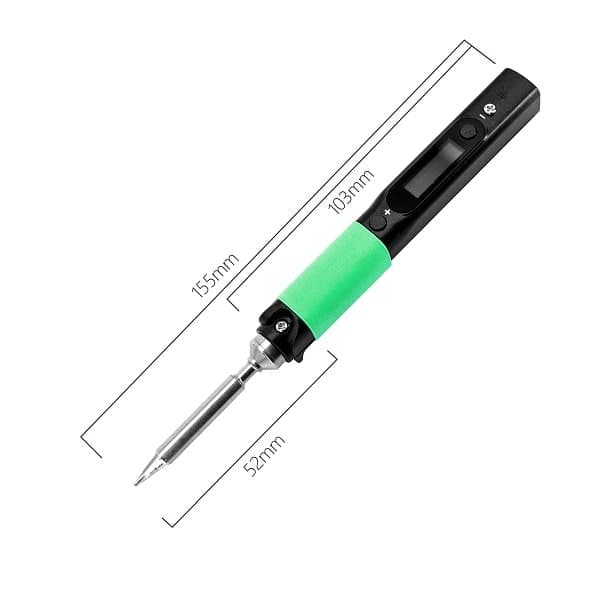
Temperature is set and shown on a 0.69-inch 96 × 16 OLED display, driven by Ralim's open-source IronOS firmware. The iron is 155 mm long with its tip and weighs about 28 g, and because it runs from any suitable USB-C PD source, a power bank can stand in for a wall outlet.
Tips and what the stock tip suits
Pine64 ships the V2 with a single tip, the ST-B2 short tip, and the iron takes Pinecil short tips. One tip rarely suits everything: fine-pitch surface-mount parts want a fine point, while heavy connectors, ground planes and thick wire transfer heat far better through a broad chisel. Plan to add those two shapes if your work spans both. Our soldering iron tip types guide explains which shape suits which job.
Check which Pinecil the listing shows
Pine64's Amazon listing still describes the original Pinecil, rated 65W with a 12–21V barrel jack, rather than the V2. Read the version shown in the listing photos and title before you buy, because the 88W rating and 24V barrel input on this page apply to the V2 only.
Why no stand changes how you use it
Skipping a stand is a real trade-off, not just a missing accessory. A hot iron needs somewhere safe to rest between joints, and without a dedicated stand you're improvising — propping it against something, or being extra deliberate about where you set it down. Budgeting for a basic stand as part of the purchase, rather than an optional extra, is the practical way to use this iron safely from day one.
Alternatives to consider
Where to buy the Pinecil V2
We link to the official Amazon listing. Prices change often, so check the current price at the retailer before you buy.
Frequently asked questions
What power supply does the Pinecil V2 need?+
A USB-C Power Delivery (PD) source, such as a PD charger or power bank, or a DC supply through its barrel jack. Pine64 rates the V2 at up to 88W from 24V; a 20V/3A USB-C PD charger gives about 60W, and lower-wattage sources deliver less power and slower heat-up.
Does the Pinecil V2 come with a stand?+
Not by default. Plan to buy a stand separately so the hot iron has a safe place to rest between joints. A stand with a weighted base and a brass or sponge tip cleaner is worth the small extra cost, and it keeps a 300°C+ tip off your desk, cables and fingers.
Is the Pinecil V2 actually fast enough to replace a bench station for field repairs?+
For the job it's built for, yes. A ~12-second heat-up means little waiting on a repair call, and the OLED temperature control gives station-like precision in a pocket-sized body. It doesn't match a dedicated station like the Hakko FX-888DX on heavy, repeated joints, but for occasional field repairs that gap rarely matters.
Can I power the Pinecil V2 from a power bank?+
Yes, if the power bank supports USB-C Power Delivery at 20V. Pine64 lists PD from 12V to 20V at 3A. A bank that only offers 5V or 12V will heat the iron far more slowly, so check its PD output rating, which is usually printed on the case as 20V⎓3A, 60W or higher.
Pinecil V2 vs original Pinecil: what changed?+
Pine64 rates the V2 at up to 88W at 24V, while its Amazon listing, which still describes the original Pinecil, gives 65W and a 12–21V barrel input. Because that listing hasn't caught up, confirm which model the photos and title show before you buy. Our Pinecil V2 vs TS101 comparison covers how it stacks up against another USB-C iron.
Related
Pinecil V2
4.7★★★★★



