HOW-TO GUIDE
How to Stop an Oscilloscope Waveform from Drifting
By the OhmSavvy Research Team ·

Safety: use the line trigger, not a probe on the mains
- To sync to the mains, select the Line trigger source. Never clip a standard probe onto mains wiring for a trigger.
- A bench scope's probe ground clips connect to mains earth. Only clip them to a point at earth potential; for non-isolated circuits use a rated differential probe or an isolation transformer.
Why sideways drift is a trigger problem
A digital scope redraws the signal capture after capture, and the trigger decides where each capture is aligned. When it locks, every sweep starts at the same point in the cycle and the waveform holds still. When it doesn't, the trace slides, rolls or blurs into overlapping copies.
This page is about horizontal movement. If the trace moves up and down instead, the cause is on the vertical side: see why a waveform shifts vertically. For trigger basics from scratch, start with how to trigger an oscilloscope.
Why does my oscilloscope waveform keep moving? Diagnose it by symptom
An oscilloscope waveform keeps moving or looks unstable because successive captures don't line up, and the direction of the movement tells you why. Rolling or sliding left and right means the trigger isn't locking; a trace that holds its position but has fuzzy, jittering edges means noise is moving the exact moment the trigger fires; a trace that jumps up and down is a vertical problem with coupling, offset or ground, not a trigger fault at all. Watch for ten seconds and decide which of these four pictures you have before touching a knob.
- Rolling or sliding sideways. Each sweep starts at a random point in the cycle. The trigger source, level or mode is wrong, and steps 1 to 3 below fix it. If the screen shows no trigger status at all, or nothing works in Normal mode, go to why an oscilloscope trigger is not working.
- Locked, but the edges shimmer. The trigger is working but fires at slightly different instants because noise rides on the edge it watches. Steps 5 to 7 apply, and the arithmetic below shows why slow edges suffer most.
- Jumping or bouncing vertically. The trigger plays no part in this. AC coupling on a signal whose duty cycle changes moves the baseline: a 0 to 5 V signal whose duty swings between 20% and 60% has an average that moves between 1 V and 3 V, so an AC-coupled trace leaps by 2 V each time. A loose ground clip, a ground loop or a channel offset being changed by AutoSet do the same. Use DC coupling and see why a waveform shifts vertically.
- Several overlapping copies, or a free-running blur. In Auto mode the scope gives up waiting after a short timeout and captures anyway. That timeout is commonly somewhere from tens to a few hundred milliseconds, depending on the model. A 2 Hz signal has a 500 ms period (1 ÷ 2), so with a timeout shorter than that the scope keeps forcing untriggered sweeps between real ones. Switch to Normal mode for slow signals.
| What the trace does | Likely cause | How to check | Fix |
|---|---|---|---|
| Rolls left or right continuously | Trigger source on the wrong channel, or level outside the signal | Read the source and level in the trigger readout | Set the source to your channel; level to mid-height |
| Freezes or blanks when you select Normal | No valid trigger event at all | Trigger status shows Wait or Ready | Fix source, level and type; see trigger not working |
| Locked, but edges blur sideways | Noise on a slow edge at the trigger level | Zoom the timebase in on the trigger point | Noise reject, HF reject, or trigger on a faster edge |
| Jumps between two or three positions | Several level crossings per repeat | Look for bursts or double edges | Increase holdoff; use a single slope |
| Bounces up and down | AC coupling with changing duty, offset changes, or ground fault | Switch to DC coupling and watch the ground marker | DC coupling; reseat the ground clip |
| Overlapping copies on a slow signal | Auto mode timing out between triggers | Compare the signal period with the update rate | Normal mode |
| Stable picture, frequency readout wanders | Signal frequency really changes | Check the frequency measurement statistics | Nothing to fix; measure the variation |
Edge jitter is easy to put numbers on. The trigger fires when the signal crosses the level, so noise shifts that crossing in time by roughly the noise voltage divided by the edge's slope. Take a 0 to 5 V edge with 200 mV of noise on it. If the edge takes 10 µs, it climbs at 0.5 V per µs, and 0.2 V of noise moves the trigger point by about 0.4 µs (0.2 ÷ 0.5). Viewed at 2 µs/div, where the edge spans five divisions, that is a fifth of a division of shimmer. The same noise on a 100 ns edge moves the trigger by only 4 ns. The chart applies that ratio, 4% of the edge time here, to edges of different speeds.
Bars use a logarithmic scale: each step is ten times the last.
Calculated trigger-point jitter for 200 mV of noise on a 0 to 5 V edge: jitter ≈ noise ÷ slope = edge time × 0.2 ÷ 5. Illustrative values; real noise is random, so the spread varies sweep to sweep.
The practical lessons follow from the arithmetic: trigger on the fastest, cleanest edge available, put the level where the slope is steepest, and let noise reject or HF reject clean up the trigger path. If the trace is steady but the frequency number keeps changing, the cause is usually in how the measurement counts cycles; see why an oscilloscope frequency reading is unstable. For a full walk-through of every trigger control, see how to trigger an oscilloscope.
1The trigger source is on the wrong channel
The trigger watches one input. If your probe is on CH2 and the source is still CH1, the scope is waiting for an event on a channel with nothing connected, and in Auto mode it free-runs. Check the source readout, usually in a corner of the screen, and set it to the channel you are looking at. With two related signals, trigger on the cleaner, more regular one.
2The trigger level sits outside the signal
The level must be a voltage the waveform passes through. Change V/div, offset or coupling, or probe a smaller signal, and the old level can end up above the peaks or below the troughs. Move it to roughly mid-height, where edges are steepest; many scopes have a 50% function for this.
3Auto vs Normal mode
In Auto mode the scope captures anyway if no trigger arrives within a short timeout, which disguises a bad trigger as a drifting picture. Normal mode only redraws on a valid trigger. If the trace freezes or vanishes in Normal, the source or level is wrong; if it holds steady, the lock is real. Very slow signals can also drift in Auto because the timeout is shorter than their period.
4Slope and either-edge triggering
Rising or falling slope both lock a simple wave. Trouble starts with the either-edge (or both) setting: some sweeps align on rising edges and some on falling ones, so a square wave shows two copies half a cycle apart. Choose a single direction, as described in triggering on a falling edge.
5Holdoff for complex signals
Bursts of pulses, serial data frames and a motor's commutation pattern all cross the level several times per repeat. An edge trigger may lock on a different crossing each time, so the picture jumps between two or three positions. Holdoff makes the scope ignore new triggers for a set time after each accepted one. Set it a little longer than the burst and shorter than the full repeat, and every sweep starts on the burst's first edge.
6Noise reject and HF reject
Noise on a slow edge can cross the level several times in a row. Each crossing is a valid trigger, so the trace jitters left and right. The trigger coupling menu offers filters that act only on the trigger path:
Noise reject
Adds hysteresis or lowers trigger sensitivity, so small wiggles near the level are ignored.
HF reject
Low-pass filters the trigger signal. Good for low-frequency signals with fast noise on them.
LF reject
High-pass filters the trigger signal, removing slow hum or baseline wander that moves the crossing.
Filter cutoffs vary by model, so check the manual. If noise is the main problem rather than a side effect, see measuring the noise floor to judge how much is the scope and how much is the circuit.
7Line trigger for mains-related signals
Hum on an audio output, ripple from a linear supply and a lamp dimmer's chopped waveform are all locked to the mains. Select Line as the trigger source and the scope triggers from its own power input at 50 or 60 Hz, so those features stand still. It doubles as a test: a disturbance that freezes under the line trigger comes from the mains.
Roll mode on slow timebases
At slow timebases, typically from tens to hundreds of milliseconds per division depending on the model, many scopes switch to roll mode. They draw samples as they arrive and scroll the trace from right to left, and the trigger has no effect on it. For a still picture, press Run/Stop or Single, turn roll mode off, or use a faster timebase.
When the signal's frequency really varies
A free-running RC oscillator, a VCO or a motor speeding up changes period from cycle to cycle. The trigger still locks the edge at the trigger point, but later edges land in different places, so the trace smears further from that point. No setting stops this; the scope is showing the truth.
Prove it is the signal
Quick fix table: how to stop an oscilloscope waveform from drifting
01
Source
Same channel as the probe
02
Level
Mid-height of the signal
03
Mode
Normal to confirm a lock
04
Slope / holdoff
One edge, one start point
05
Filters / line
Noise reject, HF reject, Line
| What you see | Likely cause | Fix |
|---|---|---|
| Trace slides steadily sideways | Source on another channel, or level outside the signal | Set source and center the level |
| Jumps between a few positions | Complex signal, several crossings per repeat | Increase holdoff |
| Fine sideways jitter | Noise near the trigger level | Noise reject or HF reject |
| Hum or ripple won't hold still | Signal locked to mains | Line trigger source |
| Continuous right-to-left scroll | Roll mode at a slow timebase | Single, Stop, or roll mode off |
| Edges smear further from the trigger | Frequency really varies | Measure it; use persistence |
Scopes in our reviews
Like any bench scope, each one below has the edge-trigger source, level, slope and Auto/Normal controls this page relies on, so a drifting trace on any of them is a settings problem, not a reason to upgrade. Where they differ is channel count, bandwidth and screen, which matter more for the signals you probe than for trigger stability. Compare them in our best beginner oscilloscopes roundup.
Bench scopes for stable triggering
Hands-on tested. 100MHz, 4 channels, 1 GSa/s, with a well-regarded user interface.
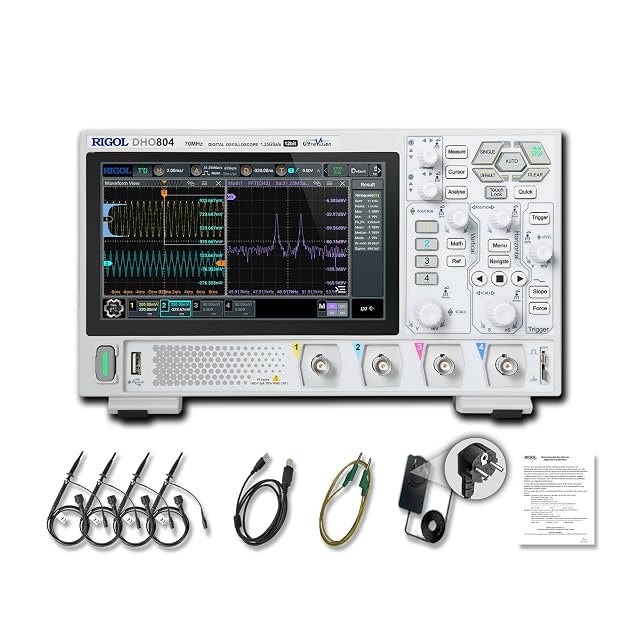
Hands-on tested. 70MHz, 4 channels, 12-bit, and a 7-inch touchscreen for quick menu changes.

Hands-on tested. 50MHz, 4 channels, 1 GSa/s, with strong community documentation.
As an Amazon Associate I earn from qualifying purchases. Prices and availability are shown on Amazon.
Frequently asked questions
Why does my oscilloscope waveform keep moving left and right?
Each capture is starting at a different point in the signal, so the sweeps land in different places. Usually the trigger has not locked: the source is on the wrong channel, the level is outside the signal, or Auto mode is free-running. Fix those three in that order.
What does the Trig'd or Auto indicator on the screen mean?
It shows whether the scope found a valid trigger. Trig'd means captures are aligned on the trigger event. Auto, or a flashing status, means nothing met the conditions in time and the scope captured anyway, so the trace drifts. Wait in Normal mode means it is still looking.
Why is my waveform stable at fast timebases but scrolling at slow ones?
Most digital scopes switch into roll mode once the timebase is slow enough, drawing data as it arrives and scrolling it like a chart recorder. That is expected, not a trigger fault. Turn roll mode off, pick a faster timebase, or use Single to freeze a capture.
Does HF reject change the waveform I see?
No. HF reject, LF reject and noise reject only filter the copy of the signal feeding the trigger circuit. The displayed trace keeps its full bandwidth and noise, so they are safe to try: if the trace locks, you fixed the trigger without hiding anything.
Can I just press Auto or AutoSet to stop the drift?
Often, yes. AutoSet picks a source, level and timebase for the strongest signal it finds, which locks simple waveforms. On complex or multi-channel signals it can pick the wrong channel or edge, and it may reset other settings, so learn the manual fixes too.
Why is my oscilloscope waveform unstable?
An unstable waveform almost always means captures are not aligned. If it slides sideways, fix the trigger source, level and mode. If it is locked but the edges shimmer, noise is moving the trigger point, so try noise reject or a steeper edge. If it bounces up and down, check coupling, offset and the ground clip instead, because the trigger cannot cause vertical movement.
Why does my oscilloscope waveform jump up and down?
Vertical jumping comes from the input side, not the trigger. AC coupling moves the trace whenever the signal's average changes, such as a PWM signal changing duty. A loose ground clip, a ground loop between earthed instruments, or AutoSet changing the offset can also shift it. Switch to DC coupling, reseat the ground and watch the channel's ground marker to see what moves.
Where to go next
How to Trigger an Oscilloscope →
The full walkthrough of source, level, slope, mode and holdoff, from a blank screen.
Why Does an Oscilloscope Waveform Shift Vertically? →
Up-and-down movement: position, coupling, probe ratio and ground, not the trigger.
Why Is My Oscilloscope Trigger Not Working? →
When the scope never shows Trig'd, work through the trigger chain gate by gate.
Why Is My Oscilloscope Frequency Reading Unstable? →
A steady trace but a wandering Freq readout has its own causes.

