HOW-TO GUIDE
Why Does My Smart Electricity Meter Show High Usage at Night?
By the OhmSavvy Research Team ·

Keep the investigation on the outside of the panel and the meter
- Switching breaker handles and reading displays is fine. Never remove the panel's dead-front cover, never open or pull the utility meter, and never break the meter seal. Meter and service-side problems belong to the utility; anything inside the panel belongs to a licensed electrician.
- If you find a warm breaker, a buzzing panel, a burning smell or discolored outlets while you search, stop, switch off the main if you can reach it safely, and call an electrician. For smoke or fire, get everyone out and call 911.
- Before you switch circuits off, think about medical equipment, sump pumps during heavy rain, freezers and anything that needs a controlled shutdown, such as a computer or a home server.
Read the interval data first
Most smart meters record consumption in fixed intervals, commonly 15, 30 or 60 minutes, and the utility shows those blocks in its online account or app. Download a few days of that data rather than staring at a single monthly bill. A kWh figure per interval converts easily into average power: 0.5 kWh in a 30-minute block means the house averaged 1 kW for that half hour, and 0.25 kWh in a 15-minute block works out to the same 1 kW. Doing that conversion for the quietest hours, usually between 2 and 5 a.m., gives you the home's baseload.
Then look at the shape. A flat, raised floor across the whole night means something runs continuously. A tall block that starts and stops on the clock means a schedule. A sawtooth of short peaks every half hour or so is a thermostat-controlled appliance cycling on and off. Each pattern points to a different group of loads, which saves a lot of guesswork later.
Rule out data quirks too. Some portals display intervals in standard time year-round, so a load that really starts at 1 a.m. may appear at midnight or 2 a.m. after a daylight-saving change. Homes with solar or a battery often have separate import and export channels, and reading the wrong one makes normal night import look strange. Estimated reads, marked as such on many portals, can also produce odd blocks that later correct themselves.
Symptoms and likely causes
| Symptom in the data | Likely cause | What to check | Who should fix it |
|---|---|---|---|
| Flat raised floor all night | Always-on loads: freezers, pumps, servers, aquariums, heaters left on | Breaker-by-breaker hunt; plug-in monitor on suspects | Owner |
| Large block starting on the hour | Water heater, EV, pool pump or battery on an off-peak schedule | Timers, tariff relay, charger and battery app schedules | Owner; installer for relay or battery settings |
| Usage climbs on cold or hot nights | Heat pump, backup strip heat, furnace fan, AC or dehumidifier | Thermostat schedule and auxiliary-heat indicator | Owner; HVAC technician |
| New jump with no change in habits | Failing appliance: stuck element, short-cycling compressor, worn well pump | Which circuit holds the extra load | Appliance service; electrician for wiring |
| Consumption with every breaker off | Meter or service-side issue, or an unlabeled feed | Meter display with the main off | Utility |
| Night import on a solar home | Normal: panels produce nothing after dark | Import vs export channels in the portal | No fix needed |
Work down the table in order. The first two rows explain the large majority of high night-time readings, and checking them takes nothing more than an app and a walk around the house.
The loads that run at night
Phantom and always-on loads. Televisions in standby, set-top boxes, game consoles that stay network-connected, desktop computers that never sleep, smart speakers, security cameras, doorbells and networking gear each take a little, and together they can add a few hundred watts. A second fridge or chest freezer in a hot garage, a hot tub keeping its water warm, a dehumidifier in the basement and a well or circulation pump are bigger contributors that people forget are running.
Water heating. An electric tank water heater recovers after evening showers and the dishwasher, often well into the night. On some US utility programs and on many European night-rate tariffs, a relay or timer deliberately runs the water heater or electric storage heaters off-peak, which shows up as a big block in exactly the hours you are looking at. That is the tariff working as designed. A tank whose element runs far longer than it used to may have sediment, a failed thermostat or a leak on the hot side, all jobs for a plumber or appliance technician.
Heating and cooling. A heat pump works hardest on the coldest hours before dawn, and if it calls for electric backup heat the draw multiplies. Programmed setbacks that end at 5 a.m. trigger a recovery surge. In summer, an air conditioner or dehumidifier may run all night in a humid climate.
Scheduled big loads. An EV set to charge after midnight, a pool pump timer, a dishwasher or washer on delayed start, and a home battery that tops up from the grid on a cheap overnight rate all land in night intervals. A Level 2 charger alone can account for several kWh per hour, so one forgotten charging schedule outweighs every phantom load in the house combined.
1Find the load one breaker at a time
You need a live view of total consumption. Many smart meters show instantaneous demand on their display or blink a test LED once per unit of energy; the faceplate states the pulse constant, so faster blinking means more power. A utility app with near-real-time data, an in-home display supplied by the utility or a whole-home monitor works too. Then, at night or whenever the unexplained load is present:
- Note the baseline reading with the house as it normally sits overnight. Wait a minute so cycling appliances don't confuse you.
- Switch off one branch-circuit breaker by its handle, wait 30 to 60 seconds, and write down the new reading. Switch it back on before trying the next one, unless you want to see cumulative drops.
- Start with the double-pole (240 V) breakers for the water heater, HVAC, dryer, range and any EV circuit, since those can draw the most. Then work through the single-pole circuits.
- When a breaker produces a large drop, walk that circuit and unplug items one by one with the breaker back on, or move to a plug-in monitor to confirm which device is responsible.
Keep the panel door open only while you work, touch nothing but the breaker handles, and don't flip breakers with wet hands or while standing on a wet floor. If a breaker is hot to the touch or the labels are missing so you can't tell what feeds what, stop and get an electrician to map and inspect the panel. An AFCI or GFCI breaker may need its own reset sequence when switched back on; the label on the breaker or the AFCI troubleshooting guide covers what to expect.
2Measure single appliances
Once the circuit is known, measure the suspect appliance directly. A plug-in energy monitor is the simplest option for 120 V plug-in loads and records kWh over a whole night. A clamp meter gives an instant reading but must go around a single conductor, so for a cord-connected appliance use a line splitter between the plug and the outlet and clamp the splitter's loop, never a two-wire cord. For the technique, see how to measure AC current with a clamp meter.
Multiplying amps by roughly 120 V gives apparent power in VA, which overstates the real watts for motors and electronics with a poor power factor. A clamp that measures true power removes that error. As a sanity check, an appliance drawing 1.5 A at 120 V for eight hours uses somewhere near 1.4 kWh at most, less if its power factor is below one.
Small electronics draw too little for most clamp meters to resolve accurately, so for routers, chargers and standby gear a plug-in monitor is the better tool; the method in measuring standby current applies to bench-level work. Hardwired loads such as water heaters, well pumps and heat pumps are not for clamping at the panel or inside the unit by a homeowner; a whole-home monitor with sensors fitted inside the panel by an electrician, or the equipment's own energy reporting, is the safe route.
When to call the utility, an electrician or a technician
Clamp meters for checking appliance draw
Measures active power (W), VA and power factor as well as AC current. CAT IV 600V / CAT III 1000V.

600 A AC clamp with inrush and simultaneous volts and amps on a backlit display. CAT IV 600V.
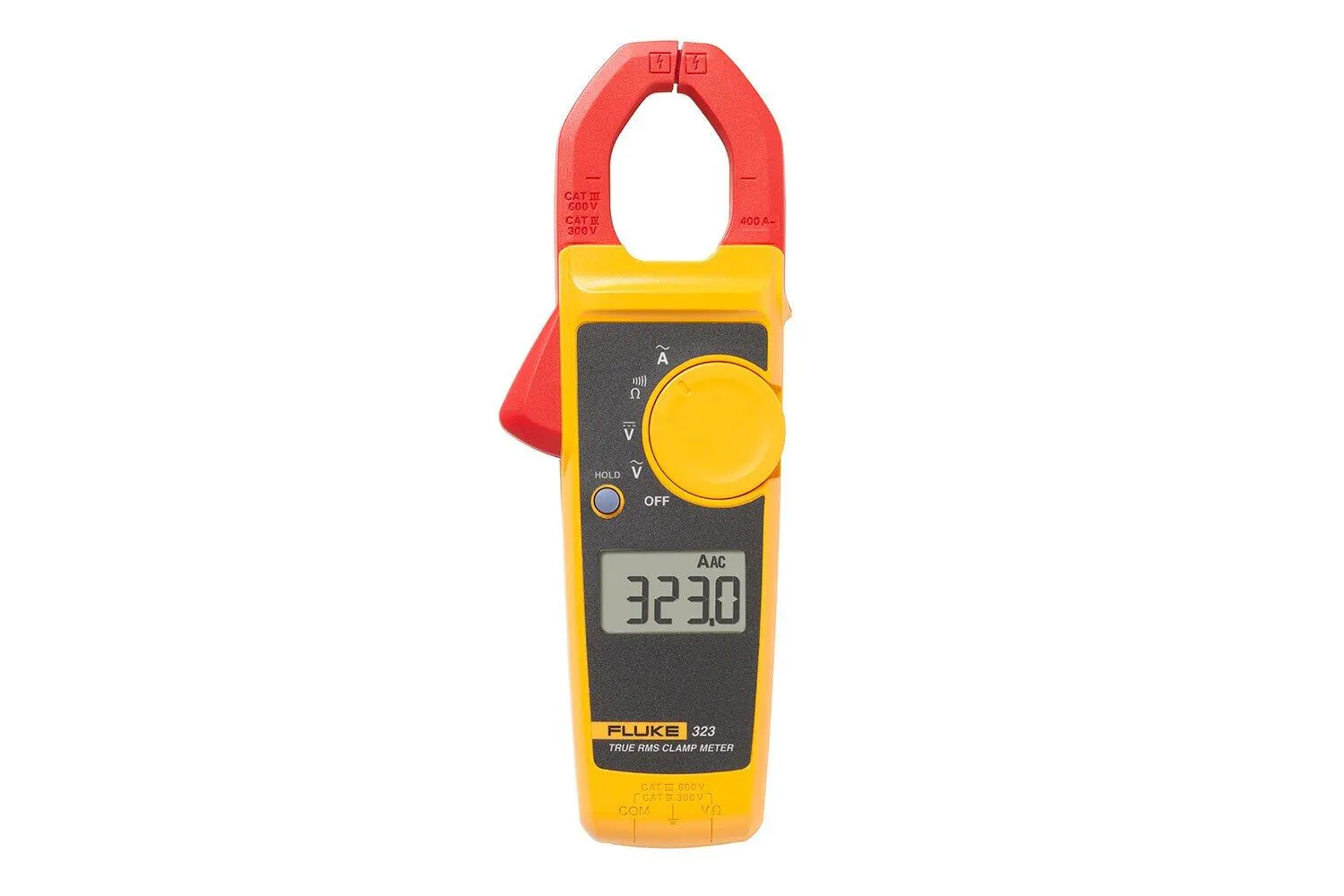
Compact True RMS AC clamp to 400A for quick amp checks through a line splitter. CAT III 600V / CAT IV 300V.
As an Amazon Associate I earn from qualifying purchases. Prices and availability are shown on Amazon.
Frequently asked questions
How much overnight usage is normal for a house?
There is no single figure. A home with a modern fridge, a router and a few chargers may idle at a couple of hundred watts, while one with a well pump, aquarium, gaming PC, second freezer or electric heating can sit well above 1 kW all night. Compare your own quiet-hour baseline over several weeks rather than a neighbor's number, and investigate when it jumps without an obvious reason.
Could the smart meter itself be faulty?
It is possible but uncommon, and it is the utility's equipment, so never open, unplug or tamper with it. If every breaker in the panel is off, including the main, and the meter display or pulse light still shows consumption, report it to the utility. They can test or swap the meter and check for a problem on the service side.
My usage spikes at exactly the same time every night. What does that mean?
A spike that starts on the same minute each night is a timer or schedule, not a fault: a water heater on an off-peak relay, an EV or home battery charging window, a pool pump, a dishwasher on delay start, or a heat pump's programmed setback ending. Check app schedules and timers before you go hunting with a meter.
Will a plug-in energy monitor find the problem?
Only for things that plug into a standard outlet. It is ideal for confirming a dehumidifier, freezer, space heater or entertainment system, but it cannot see hardwired loads such as a water heater, furnace, heat pump or well pump. For those, use the breaker-by-breaker method or have an electrician install a whole-home monitor.
Can a wiring fault or leaking appliance raise my overnight usage?
It can, but rarely by much before it becomes dangerous. Current leaking to ground inside the home still passes through the meter and is billed, yet a leak large enough to show on the bill often trips a GFCI, warms a cable or gives a tingle from a metal case. If you notice any of those, stop investigating and have an electrician test the circuits with proper equipment.



