HOW-TO GUIDE
Multimeter Symbols Explained
By the OhmSavvy Research Team ·

Dial symbols: the measurement functions
The rotary switch chooses what the meter measures. Each position carries a letter for the quantity (V for volts, A for amps, Ω for ohms) and often a small mark that narrows it down further, such as AC or DC. Reading the dial clockwise, a typical layout looks like this.
| Symbol | Function | Typical use |
|---|---|---|
| V~ / VAC | AC voltage | Outlets, transformer outputs, motor supplies |
| VDC (V + DC mark) | DC voltage | Batteries, power adapters, car electrics, circuit boards |
| mV | Millivolts | Small signals, sensor outputs, voltage drop across a contact |
| Ω | Resistance | Resistors, heating elements, coil windings |
| •))) (sound waves) | Continuity | Fuses, wires, switches: beeps on a near-zero path |
| ▶| (arrow and bar) | Diode test | Diodes, LEDs, transistor junctions |
| -|(- | Capacitance | Checking a capacitor's value against its marking |
| Hz | Frequency | Mains frequency, signal or pulse rate |
| A~ / ADC, mA, µA | Current | Load current, standby drain, sensor loops |
| °C / °F | Temperature | With a thermocouple probe plugged in |
| hFE | Transistor gain | Small socket for bipolar transistors on some budget meters |
| NCV | Non-contact voltage | Sensing live AC near a cable without touching it |
The AC and DC marks
These two marks cause more wrong readings than anything else on the dial. A tilde (~) or small sine wave means alternating current. The DC symbol is a solid line with a dashed line beneath it (); some meters write VDC or V with a straight bar instead. Pick the wrong one and the meter isn't broken, it is simply measuring something different. A 12V battery on the AC setting usually reads close to zero, and a wall outlet on the DC setting gives a small, wandering number rather than the voltage you expected. Our AC vs. DC voltage guide explains why.
Units and prefixes on the display
The display shows a number and a unit, and the unit usually carries a metric prefix. Misreading the prefix is a thousand-times error, so it is worth checking every time, especially on an auto-ranging meter that changes range on its own.
µ (micro)
One millionth. 250 µA = 0.00025 A, typical of standby drain.
m (milli)
One thousandth. 450 mV = 0.45 V; 20 mA = 0.02 A.
k (kilo)
One thousand. 4.7 kΩ = 4,700 ohms.
M (mega)
One million. 1 MΩ = 1,000,000 ohms; easy to confuse with m.
nF / µF
Capacitance in nanofarads and microfarads.
Hz / kHz
Frequency in cycles per second, or thousands of them.
Input jack labels
The sockets at the bottom of the meter are labeled too, and plugging the red lead into the wrong one is how meters blow fuses. The black lead almost always stays in COM.
| Jack label | What goes in it |
|---|---|
| COM | Black lead, every measurement (common or reference) |
| VΩ (often with ▶| and Hz) | Red lead for voltage, resistance, continuity, diode and most other functions |
| mA µA | Red lead for small currents, through a low-rated fuse |
| A or 10A | Red lead for large currents, through a heavier fuse; often time-limited |
The figures printed beside the jacks, such as "600V MAX" or "10A MAX FUSED", are the limits for that input. Current measurement is a separate skill with its own pitfalls; see how to measure milliamps with a multimeter before you move the red lead.
Display annunciators and buttons
Small words and icons around the digits report the meter's state. If a reading looks frozen or offset, one of these is usually switched on.
AUTO
Auto-ranging is on; the meter picks the range itself.
HOLD / H
The reading is frozen until you press the button again.
REL / Δ
Relative mode: shows the difference from a stored value, e.g. lead resistance.
MIN / MAX
Records the lowest and highest readings over time.
Battery icon
The meter's own battery is low; readings may drift.
TRMS / True RMS
AC readings stay accurate on distorted, non-sine waveforms.
Check HOLD before trusting a reading
Safety markings on the case
The markings on the case describe where the meter can safely be used. A CAT rating with a voltage (for example CAT III 600V) gives the measurement category and the highest working voltage the meter is built for in that location: CAT II covers plug-in appliances, CAT III fixed building wiring and distribution panels, and CAT IV the service entrance and utility side. A double square means double insulation. A triangle with an exclamation mark means read the manual for that marking, and a triangle with a lightning bolt warns of hazardous voltage at that point.
A quick way to learn your own meter
Meters with clear, standard dial markings

Budget auto-ranging meter with a simple layout.
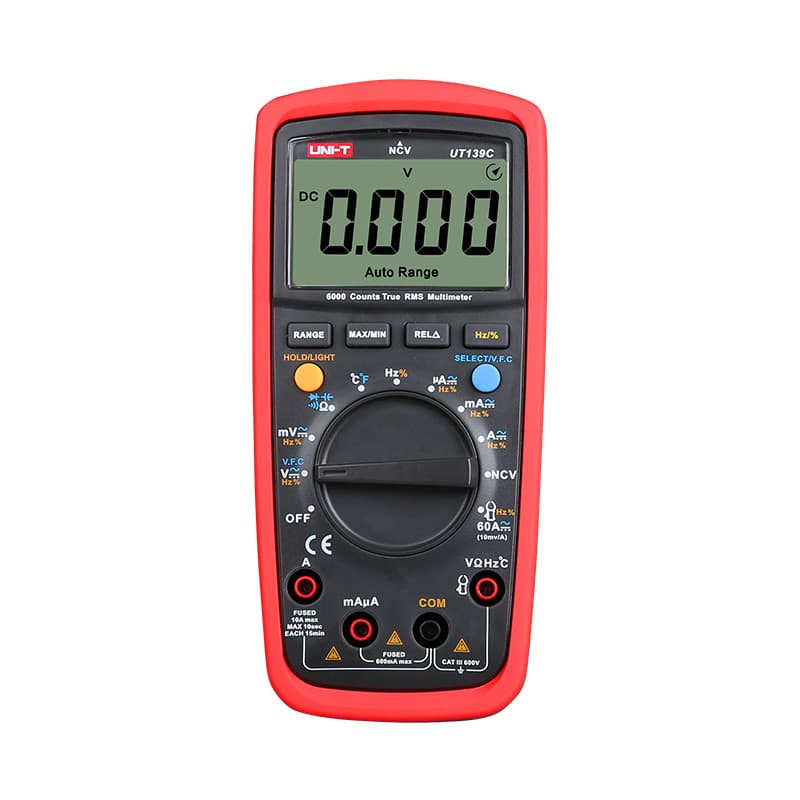
Budget True RMS meter with auto and manual ranging.
As an Amazon Associate I earn from qualifying purchases. Prices and availability are shown on Amazon.
Frequently asked questions
What does the symbol with a wavy line next to V mean?
The tilde (~) marks alternating current, so V~ is AC voltage, the setting for wall outlets and transformer secondaries. Some meters print it as V with a small sine wave above the letter, or write VAC instead; all three mean the same function.
Why does my meter have both mA and A jacks?
Each current jack is protected by its own fuse sized for its range. The mA/µA jack is for small currents and has a low-rated fuse; the A (often 10A) jack takes larger currents through a heavier fuse and a low-resistance shunt. Using the wrong one either blows the small fuse or loses resolution on tiny readings.
What does the triangle with an exclamation mark beside the jacks mean?
It tells you to read the manual before using those inputs, because there is a limit or hazard the panel has no room to spell out, usually the maximum voltage or current a jack can safely take. Treat the numbers printed next to it as hard limits.
Is the speaker symbol the same as the diode symbol?
No. The speaker or sound-wave icon is continuity, where the meter beeps below a low resistance threshold. The arrow-into-a-bar icon is diode test, which shows the forward voltage drop of a semiconductor junction. Many meters share one dial position between them and switch with a button.
What does LoZ or AutoV mean on a multimeter dial?
LoZ marks a low-impedance voltage setting. Instead of the usual high input resistance, the meter puts a much smaller load across the probes, which drains away the phantom or ghost voltage that unconnected wires pick up from neighboring live cables. AutoV versions also choose AC or DC by themselves. It suits electrical troubleshooting, not delicate electronics, where that load can disturb the circuit.


