HOW-TO GUIDE
Ceramic vs Nichrome Soldering Iron Heating Elements
By the OhmSavvy Research Team ·

How each heating element actually works
Both designs do the same basic job — convert electrical current into heat — using different construction.
Nichrome element
A nichrome (nickel-chromium) resistance wire wound around an insulating core; current through the wire generates heat, which conducts to the tip.
Ceramic element
A ceramic heating core (often with an embedded resistive element) that heats more directly and evenly, commonly paired with a sensor for closer temperature feedback.
Practical differences that matter day to day
A ceramic element typically heats up faster from cold and recovers more quickly after a demanding joint pulls heat away, because its construction generally has less thermal mass between the heat source and the tip, and often pairs with a sensor positioned close to the actual heating surface for tighter feedback. A nichrome element, by contrast, tends to be simpler and cheaper to manufacture, which is why it still shows up in budget-tier and basic fixed-wattage irons.
Heat-up speed, visualised
The practical difference in heat-up speed looks roughly like this: both elements eventually reach the same set-point, but a ceramic element typically climbs there faster from cold, while a nichrome element takes longer to reach the same working temperature.
Side-by-side comparison
| Nichrome element | Ceramic element | |
|---|---|---|
| Typical heat-up speed | Slower | Faster |
| Thermal recovery under load | Slower to replace lost heat | Generally quicker |
| Common pairing | Simple fixed-power or basic dial control | Often paired with closed-loop sensor control |
| Typical cost tier | Budget to mid-range | Mid-range to premium |
| Durability under thermal cycling | Can degrade with heavy repeated on/off use | Generally holds up well over many cycles |
Heating element type isn't the whole story
Self-regulating (PTC) ceramic elements
A subset of ceramic elements use a positive temperature coefficient (PTC) material: its electrical resistance rises as it heats up, which automatically reduces the current (and so the heat) the element draws as it approaches its design temperature, without needing a separate sensor and controller to do that job. This gives some basic, low-end irons a degree of built-in thermal self-regulation even without full closed-loop electronics, though it's a cruder form of control than a proper sensor-driven station and isn't something you can fine-tune to an arbitrary setpoint the way a true closed-loop iron can.
Which irons use which
Manufacturers don't always advertise heating element type prominently, so it's often easier to judge an iron by its heat-up time and recovery under load, covered in our full comparison, than by the heating element spec alone. Both designs show up across the budget-to-premium range; price and stated heat-up time are reasonably good proxies even when the spec sheet doesn't say outright.
Where makers do state it, the pattern holds across price tiers. Hakko describes the FX-601 as using a ceramic heater with a built-in sensor, which is how it manages closed-loop control from a dial on the handle without a separate station. At the budget end, the Q-MING 60W kit and the Liouhoum 80W pen iron both advertise ceramic cores in their Amazon listings, and the Liouhoum adds a digital readout and auto sleep. Quoted heat-up times show why direct comparisons are hard: Weller gives about 28 seconds from 50 to 350°C for the WE1010NA, while the Liouhoum listing claims 10 seconds with no start or end temperature stated. Treat any heat-up figure without both temperatures as marketing rather than a measurement.
Does this actually matter for your purchase?
For most buyers, judge an iron by its measured heat-up time, thermal recovery, and whether it has closed-loop temperature control — all outcomes you can compare directly — rather than hunting for the specific heating element type on a spec sheet. The element type is the underlying cause of those outcomes, but the outcomes themselves are what actually affect how the iron feels to use.
Ceramic-element irons we've covered
If you specifically want a ceramic heater, these picks state it in their maker or listing specs. They span a mains-powered closed-loop iron and two budget kits, so you can see the element type appear at very different price points.
Irons with a stated ceramic heater

Ceramic heater with its own sensor, 67W and a 240–540°C dial on the handle, per Hakko.

Starter kit with a ceramic element, a 200–450°C dial, five tips and a stand. No digital readout.
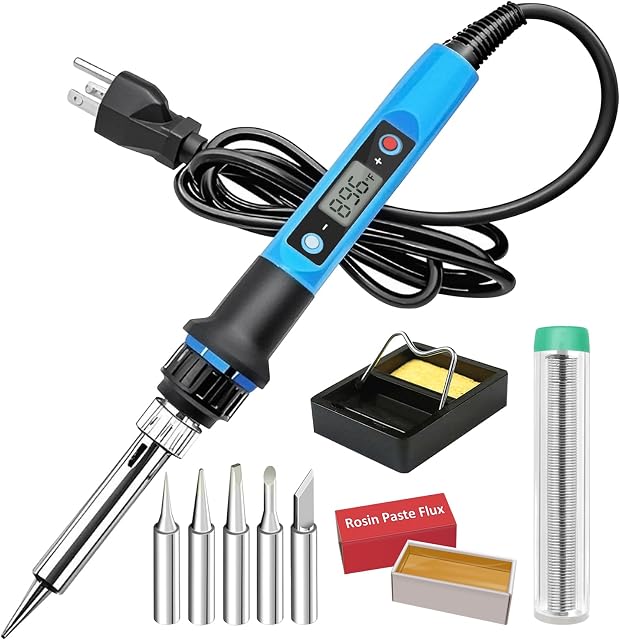
Ceramic-core pen iron with an LCD, 180–480°C and 5-minute auto sleep, per its Amazon listing.
As an Amazon Associate I earn from qualifying purchases. Prices and availability are shown on Amazon.
Frequently asked questions
Can I tell which heating element type an iron has from the spec sheet?
Sometimes it's stated directly ("ceramic heating element"); other times you have to infer it from heat-up time and price point, since ceramic elements are now common even in budget-to-midrange irons. If it's not listed and matters to you, it's worth checking the manufacturer's product page or asking before buying.
Do nichrome-element irons still make sense to buy?
Yes, for light or occasional use. A simple nichrome-element iron with a basic adjustable dial is inexpensive, mechanically simple, and perfectly adequate for general hobby soldering that doesn't demand fast thermal recovery under sustained, frequent use.
Does a ceramic heating element mean the iron has closed-loop temperature control?
Not automatically — those are two separate things. The heating element type affects how fast heat is produced and how evenly it holds; closed-loop control depends on whether there's a temperature sensor feeding back to active control electronics, covered in our soldering iron vs. soldering station comparison. Many ceramic-element irons do pair with closed-loop control, but the two aren't the same feature.
Which lasts longer, ceramic or nichrome?
Both can last a long time with reasonable use; ceramic heating elements are generally considered more durable against thermal cycling stress over many years of regular on/off use, since the ceramic material handles repeated heating and cooling with less degradation than a wound wire element does over the same cycles.
Can I replace a burned-out heating element instead of buying a new iron?
Often, yes. Many stations and cartridge irons sell the heater, or a heater-and-sensor assembly, as a spare part, and some budget pen irons use generic ceramic cores. Match the exact part number and voltage, unplug the iron, and check the new element's resistance with a multimeter before reassembly. On very cheap irons a replacement can cost nearly as much as the whole tool.



